Windows 7 內建 IE8,工具列介面與舊版不同。使用者自訂工具列後,可能因他人誤操作而恢復預設。透過群組原則可鎖定所有工具列,防止被變更。
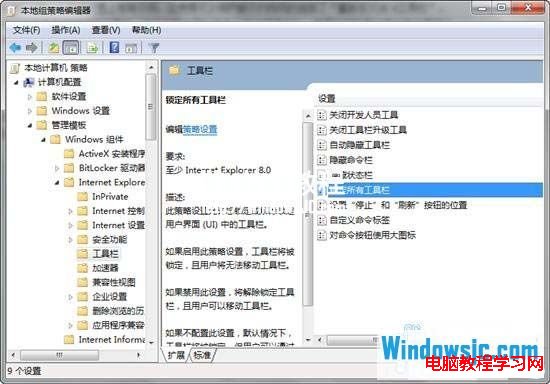
1、執行 gpedit.msc 開啟群組原則編輯器,依序展開:電腦設定 → 系統管理範本 → Windows 元件 → Internet Explorer → 工具列,雙擊右側「鎖定所有工具列」。
gpedit.msc
2、選擇「已啟用」,按下確定即可鎖定工具列配置。
安裝 Windows 8.1 遇到 MBR/GPT 分區表錯誤解決實錄:UltraISO 製作 UEFI 啟動 U 盤完整教程
Win8 升級 8.1 後 C 槽暴漲 清理舊系統檔案瘦身術
Win10 10547 已知問題匯總:語言包延遲、商店需手動更新、記事本權限錯誤
Win10 離線地圖在哪?下載與使用脫機地圖完整教學(含釣魚島標示驗證)
Win7 開機動畫變綠色滾動條?一招恢復預設 Windows 標誌動畫
Win10 週年更新應用商店分類顯示亂碼 (英文數字混雜)?官方已確認 Bug,待修復
Windows 8/8.1 任務列輸入法圖示消失?三步驟找回輸入指示器
手機版 Windows 10 全方位展示:觸控版 Office、通用應用、互動通知、Skype 整合