Windows 7 工作列輸入法圖示突然消失,重開機也無效。通常是語言列設定被更改為「隱藏」或「浮動」。透過控制台語言設定即可恢復停駐於工作列。
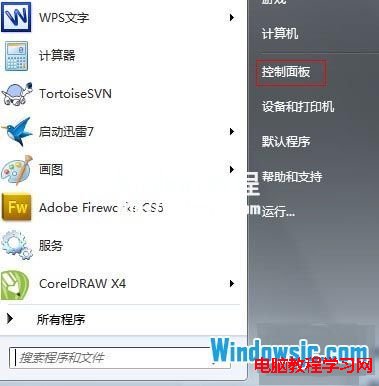
1、開啟「開始」→「控制台」。
2、選擇「變更鍵盤或其他輸入法」。
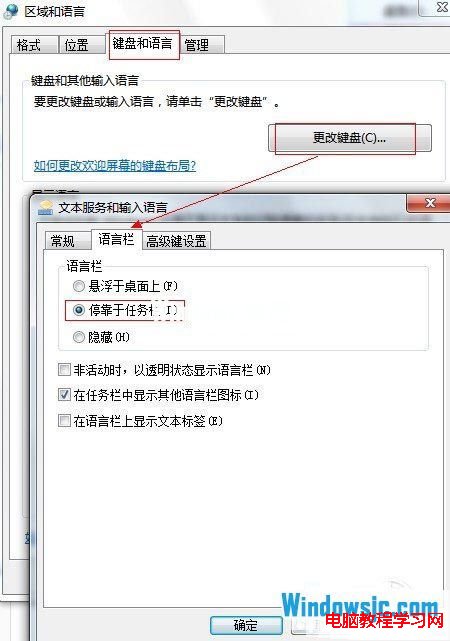
3、在「地區和語言」視窗 →「鍵盤和語言」分頁 →「變更鍵盤」→「語言列」分頁 → 選擇「停駐在工作列」→ 確定套用。
Windows XP 直接升級 Win10?僅支援 ISO 全新安裝,硬體需求低但驅動相容是關鍵
Win10 版本功能對照表:家庭版、專業版、企業版、教育版差異詳解
Windows 7 開機 NumLock 指示燈不亮問題兩種解決方法
雙系統擴充 C: 槽導致 Win10 引導項消失?EasyBCD 修復引導完整教學
Win10 一週年更新 14332 版修復內容完整彙總
Win7 無法修改系統時間?三大成因(電池、權限、病毒)與排查流程
Win7 64位系統 IE9 無法使用農業銀行網銀?官方證書工具一鍵直達登錄頁
Win8 關閉內建小遊戲 功能開啟/關閉 Windows 功能一鍵搞定