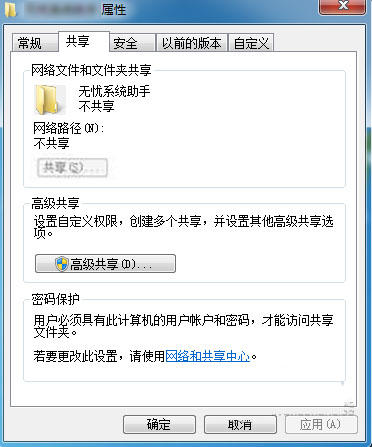
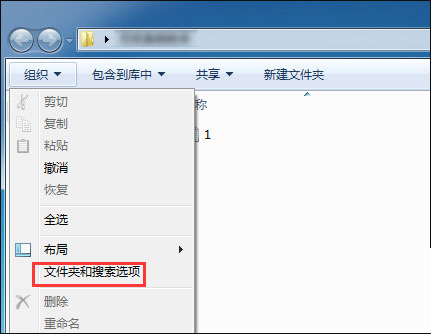
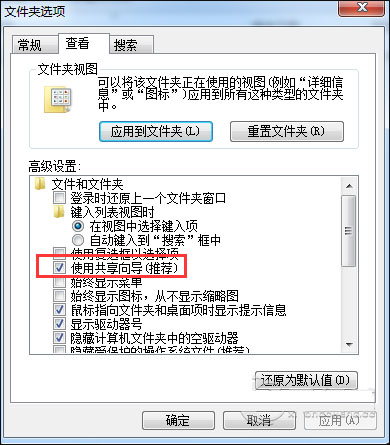
Win7 資料夾右鍵「共用」分頁的「共用」按鈕變灰,主因為「使用共用精靈」被優化工具關閉。重新啟用即可恢復共用功能。
安全提醒:啟用檔案共用會增加區域網路攻擊面,若非必要建議平時保持關閉,僅在需要時暫時開啟。
Win10 PC/Mobile 預覽版 14965 更新內容完整彙總
Win7 連接隱藏 WiFi 完整教程:手動添加網絡配置參數圖文詳解
Win7 關閉螢幕放大鏡與取消開機自動啟動:快速鍵與設定面板雙重教學
Win10 記事本在哪裡?五種開啟方式與兩種固定到開始螢幕方法
微軟正式宣布:2015年7月終止Windows Server 2003支援,企業升級刻不容緩
Windows 10 Build 10162 全新安裝與啟動完整圖文教學 (含官方金鑰)
Windows 10 消費者預覽版(Build 9926)升級必讀:須先安裝 KB3025380 修補程式
Windows 8 各版本介紹:DP/CP/RP 測試版與正式版四大零售版本差異