Windows XP Windows 7 Windows 2003 Windows Vista Windows 綜合教學 Linux 系統教學
Windows 10 Windows 8 Windows 2008 Windows NT Windows Server 電腦軟體教學
您现在的位置: Windows教程網 >> Windows教程 >  >> Windows 綜合教學 >> 關於 Windows

Win7 調整 Alt+Tab 切換視窗顯示數量:註冊表修改 CoolSwitchColumns 值

編輯:關於 Windows

Win7 Alt+Tab 切換視窗預設顯示固定欄數,透過註冊表修改 CoolSwitchColumns 值可自訂每行顯示幾個視窗縮圖,適應多工習慣。

修改步驟

  1. Win+R 輸入 regedit 開啟註冊表編輯器。
  2. 定位:HKEY_CURRENT_USER\Control Panel\Desktop。

  3. 在右側找到 CoolSwitchColumns,雙擊修改數值資料為想要的欄數(如 4、6、8),確定。

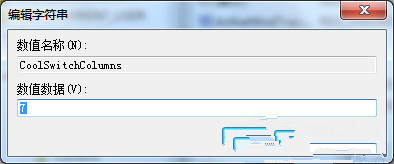
  4. 重新登入或重開機生效,Alt+Tab 介面即依新欄數排列。

相關值: 同層還有 CoolSwitchRows(列數),可一併調整。Win8/10 的切換介面已改為縮圖預覽列,此設定不再適用。

Copyright © Windows教程網 All Rights Reserved