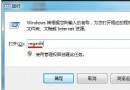
Win8 開始畫面預設純色背景,若想與桌面壁紙一致,只需在工作列屬性中啟用選項即可。
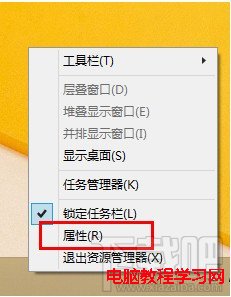
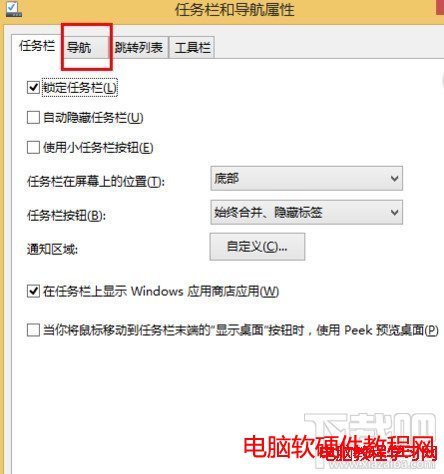
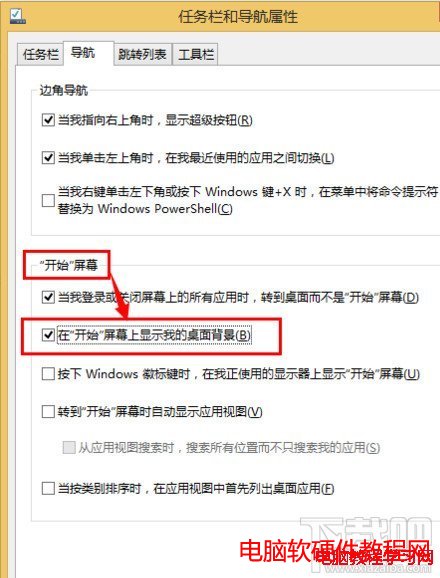
啟用後,更換桌面壁紙會同步反映在開始畫面,視覺風格統一協調。
Windows 10 正式版 7 大不可忽視缺點總整理:設定混亂、Wi-Fi Sense 風險、強制更新、Edge 體驗、OneDrive 退化、Store 慘淡、DVD 支援移除
Win10 TH2 大更新自動卸載第三方防毒軟體 (Bitdefender、Spybot、NOD32 等)?相容性檢測觸發,Defender 自動接管防護
Windows 10 Build 10041 體驗評測:穩定性略增但 Bug 仍多,建議辦公電腦勿作主力系統
Win10 高解析度筆電字體模糊?啟用程式相容性「高 DPI 下停用縮放」銳利化
想全新安裝 Windows 10?微軟警告:現有版本啟用金鑰已失效,唯一路徑為就地升級
Win10 任務列、開始選單、小娜無法點擊?六大修復方案徹底解決