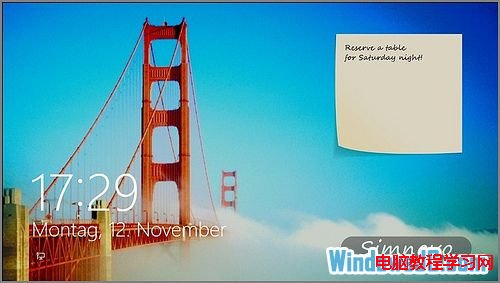
Windows 8 鎖定畫面預設僅顯示時間、日期、網路狀態與應用程式通知,無法直接查看待辦事項。安裝 Windows Store 應用 TuneUp IncrediLock,即可在鎖定畫面新增便利貼,並更換精美鎖屏壁紙。
注意:此應用僅適用於 Windows 8/8.1,Windows 10 鎖定畫面機制不同,請使用 Win10 內建的「便利貼」應用或第三方工具。
C 盘出现 $Windows.~BT 文件夹很大?那是 Win10 升级包在后台下载,别删!
Windows 10 Build 10525 更新內容與上手圖集:彩色標題列、壓縮儲存、已知問題(熱點失效、電影電視需更新、語言包不可用)
Windows 7 解決 QQ 訊息導致播放器音量變小:關閉通訊活動偵測功能
Windows 7 提示「系統資源不足」四大原因與解決方案
Win10 如何刪除 Windows Hello 指紋?設定 → 帳戶 → 登入選項 → 指紋「移除」
【教學】Windows 10 Build 10074 開始選單隱藏背景模糊效果啟用法(登錄修改)
Win7 瀏覽器左上角出現網域重導向?修改 hosts 檔案移除惡意/殘留導向項
Windows 7 內建「問題步驟記錄器」PSR.exe:圖文並茂記錄操作流程,遠端協助神器