Win7 瀏覽網頁時左上角顯示網域重導向,非網站毒性問題,多為 `hosts` 檔案殘留導向項 (惡意軟體植入、舊設定遺留、廣告攔截規則過期) 導致。清理 hosts 即可解決。
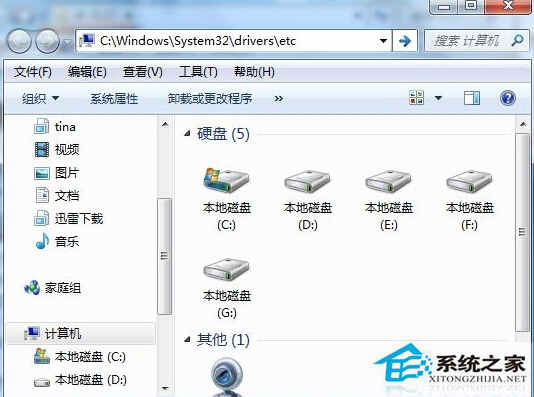
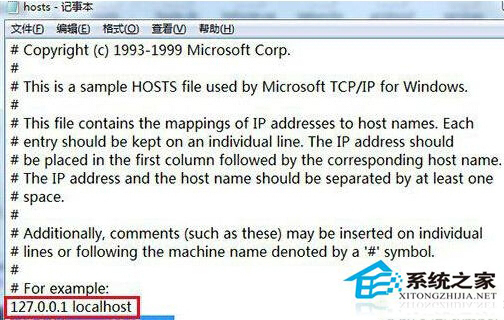
# Copyright (c) 1993-2006 Microsoft Corp.
#
# This is a sample HOSTS file used by Microsoft TCP/IP for Windows.
#
# This file contains the mappings of IP addresses to host names. Each
# entry should be kept on an individual line. The IP address should
# be placed in the first column followed by the corresponding host name.
# The IP address and the host name should be separated by at least one
# space.
#
# Additionally, comments (such as these) may be inserted on individual
# lines or following the machine name denoted by a '#' symbol.
#
# For example:
#
#      102.54.94.97     rhino.acme.com          # source server
#       38.25.63.10     x.acme.com              # x client host

127.0.0.1       localhost
::1             localhost
乾淨的 hosts 檔案,淨化本機網路解析環境。
微軟 10 月安全更新:3 項嚴重級漏洞修補,含 IE 累積更新、.NET Framework、核心模式驅動程式
Win10 開啟資料夾閃退怎麼辦?解除安裝最近更新並重開機即可修復
Win7 取消自動睡眠鎖屏:在電源選項→更改計劃設定→「讓電腦進入睡眠狀態」選擇「永不」
Windows 10 Build 10159/10162 遇啟動問題,微軟稱伺服器測試中請忽略
Win10 升級後網速變慢怎麼辦?無線網卡 20/40MHz 共存模式修正教學
Windows 7 視窗拖到螢幕邊緣自動最大化如何關閉?登錄修改法禁用 Aero Snap
Win10 Edge 瀏覽器如何重裝?刪除套件資料夾 + PowerShell 重註冊 AppXManifest 徹底重置