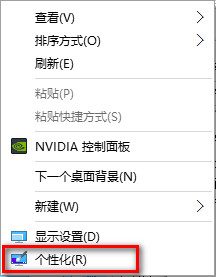
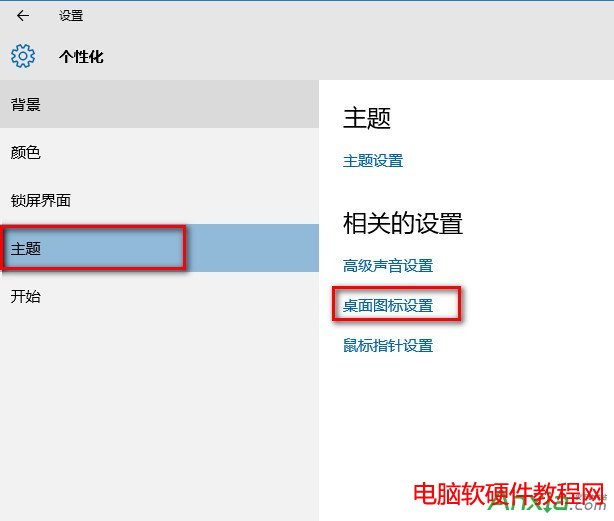
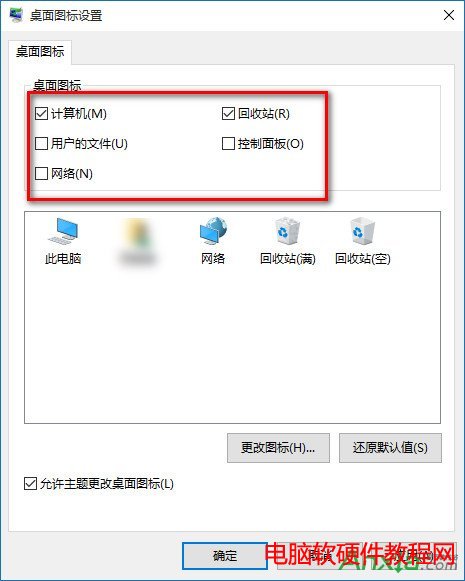
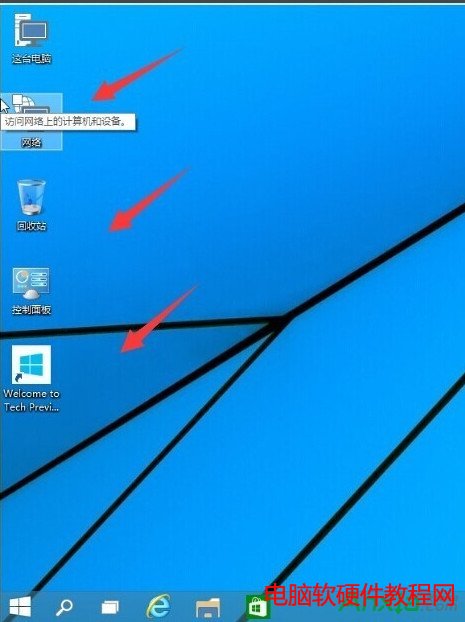
Windows 10 預設桌面只顯示「資源回收筒」,常用的「這台電腦」(我的電腦)、「網路」、「控制台」等圖示皆隱藏。以下教你幾步驟找回這些系統圖示,提升操作效率。
小提醒:「使用者的檔案」即為「我的文件」,若不習慣使用可不勾選。此設定同樣適用於 Windows 8.1 系統。
Win7 安裝 Office 2016 出現 1042 錯誤?登錄檔 UserData 權限設定修復
Win10 讓 QQ 永久以「系統管理員身分執行」:相容性設定一次搞定
Win8 停用運行中服務釋放記憶體:Ctrl+Shift+Esc 開啟工作管理器→服務分頁→右鍵運行中服務→停止
Win10 關閉開機歡迎畫面,加快啟動速度的設定教學
Windows 7 清除 Firefox 快取檔案教學
Windows 8 備份登錄檔圖文教學:匯出 .reg 檔案完整保存
Win7 透過登錄表禁用光碟燒錄功能:釋放資源防止誤操作
Win10 D 槽變成「我的文件」怎麼辦?還原預設位置或移動回目標資料夾