Firefox 瀏覽器快取檔案過多會拖慢電腦速度並可能洩露隱私。以下為 Windows 7 環境下查找並刪除快取的步驟。
about:cache 按 Enter (點選「我保證會小心」)。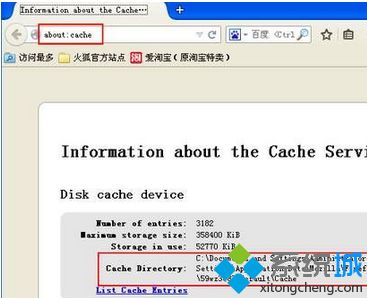
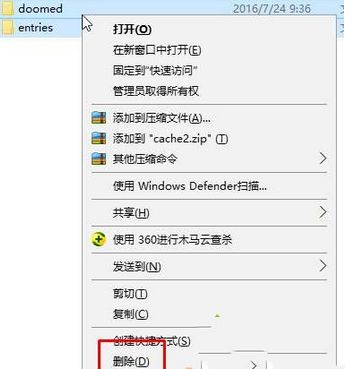
定期清理瀏覽器快取有助維持系統效能與隱私安全。
Windows 10 10240 正式版 USB 製作與安裝詳細教學
Win10 偵測不到網卡驅動?裝置管理員卸載重掃 + 驅動人生網卡版離線修復全流程
Windows 7 任務列時鐘顯示農曆、星期、溫濕度教學:使用軟媒時間
WinXP 桌面變灰白、經典主題消失?啟動 Themes 服務即可恢復
Win10 預覽版十大實用技巧:關閉同步、啟用 Cortana、快速通道、回收空間、虛擬桌面等完整指南
Win10 執行速度慢怎麼辦?視覺效果調整為最佳效能模式提升速度
Win10 15014 新功能彙總:Windows Store 電子書上架、Edge 閱讀器強化、自訂強調色、儲存空間自動清理、Wi-Fi 設定整合、電源滑桿