Windows Server 2003 終端機服務支援兩種進階連線模式:
1. /console 直接連線主控台工作階段 (Session 0),如同坐在伺服器前。
2. shadow 0 隱藏式監控主控台工作階段,遠端與本地使用者同時看見同一畫面並可互動。
本文提供完整指令語法、前置條件、錯誤代碼對照與群組原則啟用遠端控制步驟。
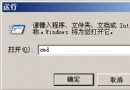
mstsc -v:伺服器名稱 /F -console
mstsc:遠端桌面連線執行檔。-v:指定目標伺服器。/F:全螢幕模式。-console:連線 Session 0 (主控台)。行為:
-console) 進入伺服器 (Session N)。shadow 0網域\使用者 要求遠端控制您的工作階段。接受嗎?」→ 本地使用者點「是」。| 代碼 | 訊息 | 原因/對策 |
|---|---|---|
| 7044 | Remote control failed. The request to control another session remotely was denied. | 本地使用者點「否」或逾時未回應 → 確認本地同意。 |
| 7050 | The requested session cannot be controlled remotely. | 嘗試從主控台 shadow 其他 Session、或 shadow 自己的 Session → 必須從**非主控台** Session 執行 shadow。 |
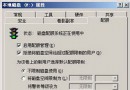
| 7051 | The requested session is not configured to allow Remote Control. | 未啟用群組原則「遠端控制規則」→ 見下節啟用。 |
gpedit.msc →「電腦設定」→「系統管理範本」→「Windows 元件」→「終端機服務」。gpupdate /force 生效。-console 與 shadow。Windows Server 2003 系統服務備份與災難復原實務
Windows Server 2003 手動優化九大實戰技巧:自動登入、關機、主題、聲音、DirectX、IE 安全、移動硬碟、頻寬、域環境自動登入
Windows Server 2003 應用技巧總匯:六大「取消」優化與驅動簽名、管理精靈建議
Windows Server 2003 系統管理必學 6 大應用技巧:安全、效能、維護全面強化
Windows Server 2003 多媒體效能優化指南 解決影音播放卡頓無聲難題
校園 Windows 2003 Web 伺服器常見故障與 IIS 6.0 應用程式集區隔離機制解析