Windows XP Windows 7 Windows 2003 Windows Vista Windows 綜合教學 Linux 系統教學
Windows 10 Windows 8 Windows 2008 Windows NT Windows Server 電腦軟體教學

Win10 禁用 Win 鍵/組合鍵 註冊表修改法 防止遊戲誤觸

編輯:Win8 常見問題解答

遊戲中誤按 Win 鍵導致最小化/彈出開始功能表,可透過註冊表 DisabledHotkeys 禁用指定 Win+字母 組合鍵,保留其他系統熱鍵 (如 Win+R/E/L)。

操作步驟

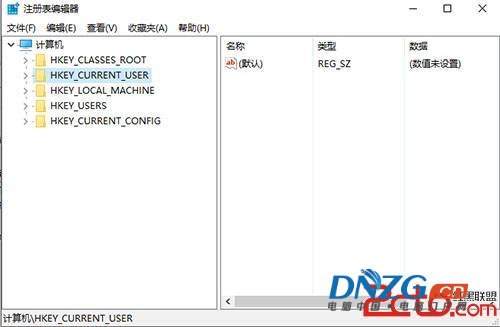
  1. Win+R → regedit → 確定。
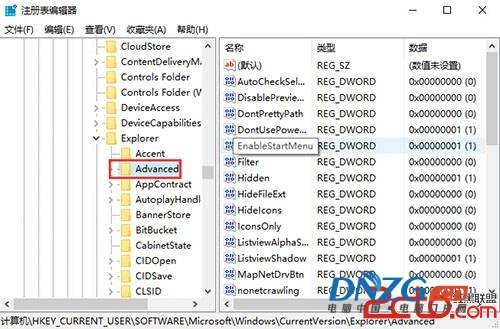
  2. 導航至:
    HKEY_CURRENT_USER\Software\Microsoft\Windows\CurrentVersion\Explorer\Advanced
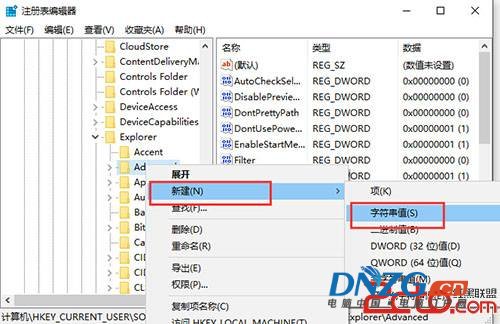
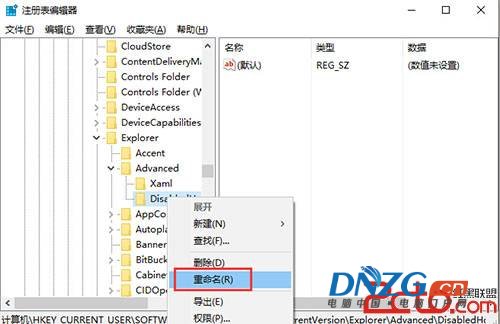
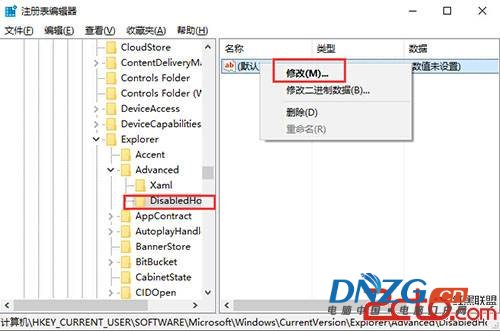
  3. 右鍵 Advanced → 新增 → 字串值 → 命名 DisabledHotkeys。
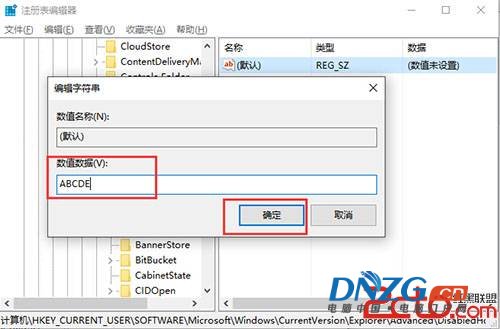
  4. 雙擊 DisabledHotkeys → 數值資料填入要禁用的字母 (連續寫入,不分隔),例如 ABCDE 代表禁用 Win+A ~ Win+E。


  5. 確定 → 重啟電腦或重新登入生效。

Win+R 開啟執行

輸入 regedit

註冊表編輯器根節點

Advanced 鍵值路徑

新增字串值 DisabledHotkeys

重命名為 DisabledHotkeys

修改字串值

數值資料填入 ABCDE

常見禁用組合建議

  • 遊戲防誤觸:ASDWQE (移動/技能鍵常與 Win 組合誤觸)。
  • 完全禁用 Win 鍵:需第三方工具 (如 SharpKeys 映射 Win→無、AutoHotkey LWin::Return),註冊表法無法禁用單獨 Win 鍵。
  • 恢復:刪除 DisabledHotkeys 值或清空數值資料 → 重啟。

此法僅影響當前使用者,若需全機生效,請在 HKEY_LOCAL_MACHINE 同路徑操作 (需管理員權限)。

Copyright © Windows教程網 All Rights Reserved