Windows XP Windows 7 Windows 2003 Windows Vista Windows 綜合教學 Linux 系統教學
Windows 10 Windows 8 Windows 2008 Windows NT Windows Server 電腦軟體教學

Windows 8/8.1 關閉 UEFI 安全開機以安裝 Linux 雙系統完整教學

編輯:Win8 常見問題解答

預裝 Win8/8.1 的電腦採用 UEFI 安全開機,預設阻擋未簽署的 Linux 開機載入器。必須進入 UEFI 設定介面關閉 Secure Boot 才能順利雙開機。
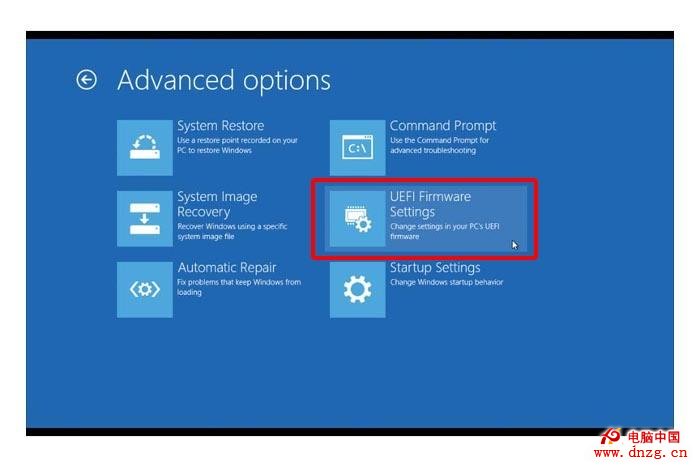
進入 UEFI 設定步驟

  1. Win + I → 「變更電腦設定」 → 「更新與復原」(8.1)或「通用」(8) → 「進階啟動」 → 「立即重新開機」。
  2. 重開機進入選單:疑難排解 → 進階選項 → UEFI 固體設定 → 重新開機。

關閉 Secure Boot

於 UEFI 介面(類 BIOS 畫面)切換至「Boot」或「Security」索引標籤,將「Secure Boot」設為「Disabled」,按 F10 儲存離開。
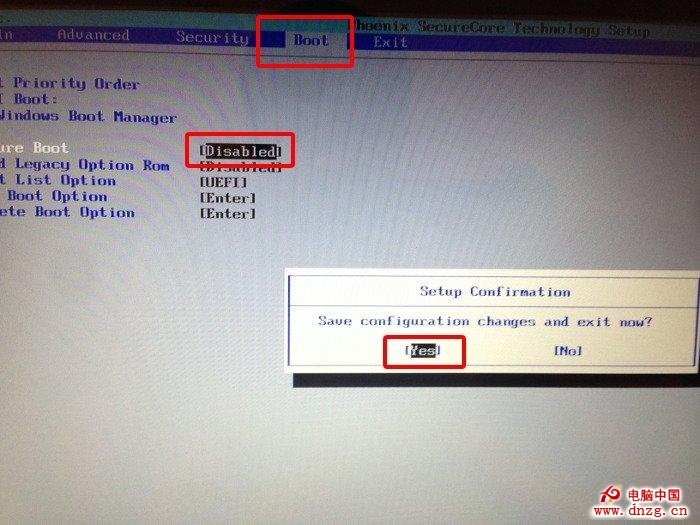
完成後即可正常啟動 Ubuntu 等 Linux 安裝媒體進行雙系統部署。注意:ARM 架構裝置無法關閉 Secure Boot,僅限 x86/x64 平台。


Copyright © Windows教程網 All Rights Reserved