Windows XP Windows 7 Windows 2003 Windows Vista Windows 綜合教學 Linux 系統教學
Windows 10 Windows 8 Windows 2008 Windows NT Windows Server 電腦軟體教學

Windows 10 開啟群組原則彈出命名空間錯誤?刪除衝突 ADMX 檔案修復

編輯:Win8 常見問題解答

Windows 10 專業版開啟群組原則編輯器 (gpedit.msc) 時彈出「命名空間已被定義為儲存區中另一檔案的目標命名空間」錯誤,主因是 Microsoft-Windows-Geolocation-WLPAdm.admx 檔案重複定義。刪除該檔即可修復。
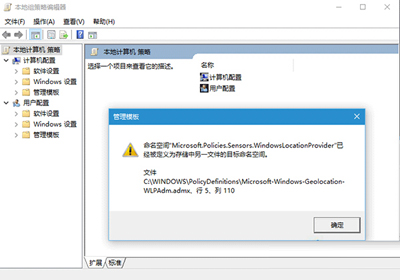
修復步驟

  1. 進入路徑:C:\Windows\PolicyDefinitions
  2. 找到 Microsoft-Windows-Geolocation-WLPAdm.admx 並刪除。
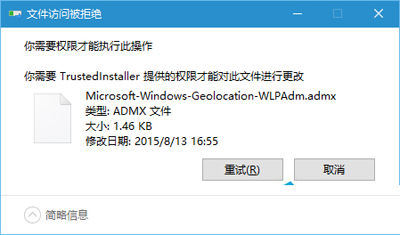
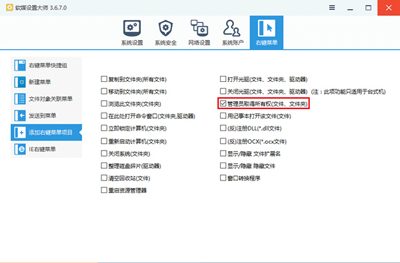
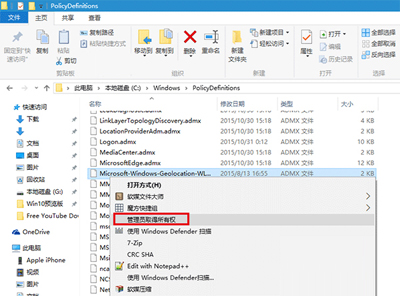
  3. 若提示「檔案存取被拒絕」,需取得檔案擁有權:
    建議使用「軟媒魔方」→「設定大師」→ 為右鍵選單加入「管理員取得所有權」功能。
  4. 右鍵該檔案 →「管理員取得所有權」→ 完成後再次刪除(建議移至資源回收筒以備不時之需)。

刪除衝突檔案後,重新開啟群組原則編輯器即不再彈出錯誤視窗。此為官方已知問題,後續更新可能自動修正。

Copyright © Windows教程網 All Rights Reserved