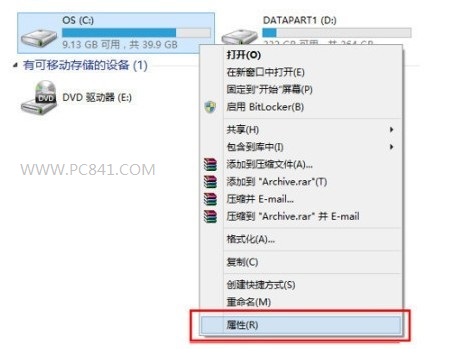
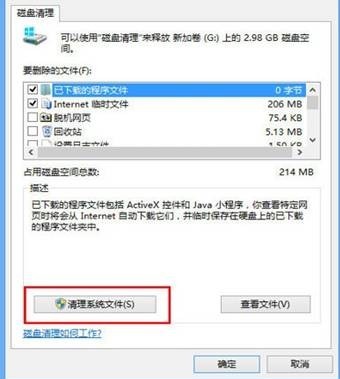
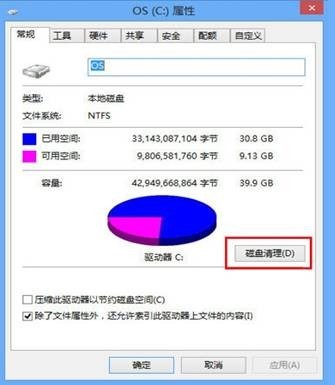
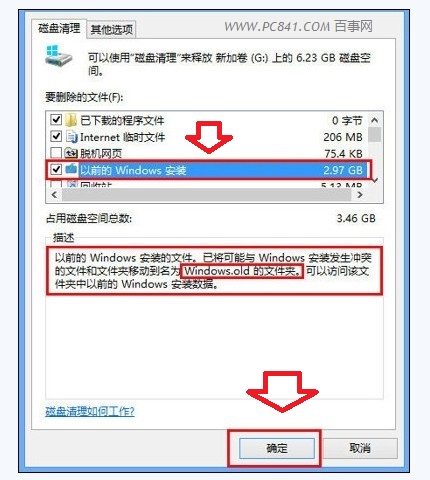
升級保留的 Windows.old 資料夾佔用數 GB 空間。透過磁碟清理 → 清理系統檔案 → 勾選「以前的 Windows 安裝」即可安全移除。
Windows.old
系統會在 28 天後自動清除,手動操作可立即回收空間,特別適用於 SSD 系統碟。
Win8 多工作業切換全技巧:滑鼠、觸控、熱鍵三種操作方式
Windows 自動備份神器:ROBOCOPY 指令設定定時/監控備份
僅供參考:Windows 8 相容國外防毒軟體列表(AV-Test 評測),國產主流產品已全面支援
Windows 10 內建郵件應用大改版:基礎辦公需求完全滿足
免費一鍵升級 Win10 方法:騰訊電腦管家/360 合作專屬通道(官方升級亦可)
Win8 應用精選:Surface 上的社交生活——QQ、人人網、新浪微博體驗報告
Win8 爆音破音終極解法:停用 Multimedia Class Scheduler 服務並解除與 Audio 相依性
Win 10 升級 10525 版 (TH2) 須知四大重點:Insider 身分、授權激活、升級路徑、自動激活