現象:剛安裝完成的 Windows 8 開機後 CPU 持續 20-30%,硬碟存取燈持續閃爍,未安裝第三方軟體。
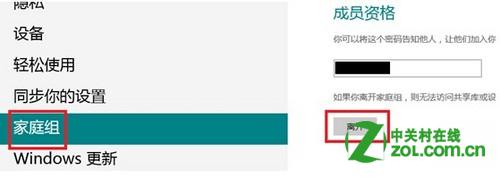
使用 Microsoft 帳戶(Windows Live ID)登入會自動加入家庭群組,聯網同步使用者設定資料導致 CPU/磁碟高載。
若需同步功能,可於非尖峰時段手動觸發同步,或改用本機帳戶登入避免自動加入家庭群組。
Win8.1 內建「照片」App 深度評測:從瀏覽到後製修圖一站式解決
Windows 8.1 Update 2 發布資訊總覽:推送方式、命名由來與升級策略
Windows 8 變更使用者帳號名稱完整步驟
Windows 8 IE10 內建廣告過濾:利用「追蹤保護」匯入 EasyList 免外掛攔截廣告
Win8 開啟工作管理員 5 大招:快捷鍵、右鍵、搜尋、執行全涵蓋
Windows 8 開啟內建畫圖:三種快速啟動方法
Win8 C 槽空間不足?動態磁碟擴展 C 槽實戰紀錄
企業遠程桌面 Web 連線安全強化四大關鍵設定