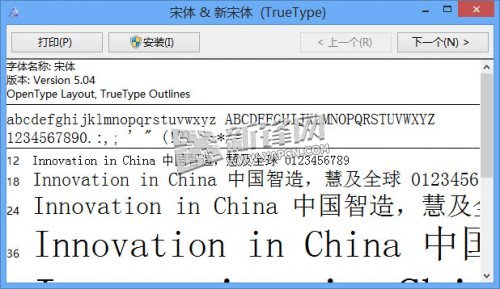
Windows 8.1 更新細明體字型後中文顯示優化,但英文/數字小字號出現發虛、鋸齒、渲染不佳問題。暫時解決方案:替換回 Windows 8 版細明體字型檔。
simsun.ttc
英文字型發虛問題示意
安裝字型對話框
此為暫時替代方案,期待微軟後續更新修正字型渲染引擎。
Win8 工作列鎖定/解鎖設定:一鍵固定位置防誤拖曳
Windows 8 极速開機秘密:混合啟動技術深度解析
Win8 WiFi 自動關閉?關閉休眠/睡眠模式保持網路常駐
Windows 8.1 Update 更新錯誤 80070020、80073712、0x800f081f 修復指令
Win8 修改 C 槽磁碟機名稱的註冊表教學
打造專屬 Windows 8 開始畫面:磚塊完整操作指南
Win8 IE 彈出「剪貼板存取」提示框?網際網路選項 → 安全性 → 自訂等級 → 腳本 → 允許對剪貼板存取 → 啟用
Windows 8 刪除同步至雲端的個人設定:關閉同步並從雲端移除資料