Windows XP Windows 7 Windows 2003 Windows Vista Windows 綜合教學 Linux 系統教學
Windows 10 Windows 8 Windows 2008 Windows NT Windows Server 電腦軟體教學

Win8.1 企業版新增「開始畫面佈局控制」:IT 管理員可鎖定磚塊排版防變更

編輯:Win8 系統應用技巧

Windows 8.1 Enterprise 引入「開始畫面控制」新特性,專為 IT 專業人員設計:可設定工作組使用者的預設開始畫面磚塊佈局,並防止一般使用者修改。
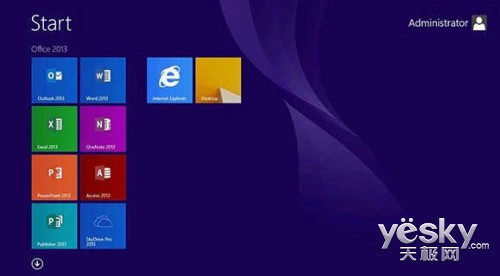
操作流程

  1. 依偏好安排開始畫面磚塊(如固定 Office 組件、傳統桌面、IE 瀏覽器)。
  2. 使用 PowerShell 匯出佈局為 XML 檔:
    Export-StartLayout –As XML –Path contoso-mgmtLayouts$ManagedUser.xml
    
  3. 開啟群組原則編輯器(Win + R 輸入 gpedit.msc)→「使用者設定」→「管理範本」→「『開始』選單與工作列」→ 找到「開始畫面佈局」原則項目→ 啟用並指定上述 XML 檔路徑。
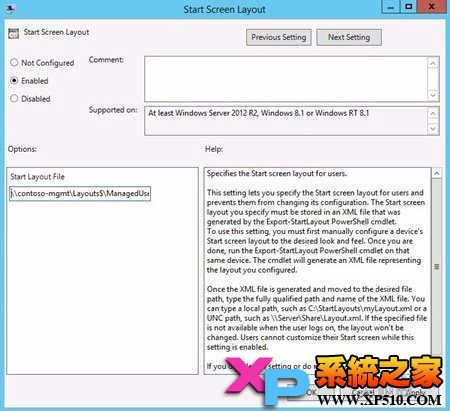
效果

開始畫面佈局完全鎖定:一般使用者無法新增/移除磚塊、無法重新排序。確保企業環境介面一致性,降低支援成本。

Copyright © Windows教程網 All Rights Reserved