離線更新包共四個,必須依序安裝,每裝一個重開機:
跳過重開機直接裝下一個會導致開機失敗。
HKEY_LOCAL_MACHINE\SOFTWARE\Microsoft\Windows NT\CurrentVersion → CurrentBuild = 9600, CurrentBuildNumber = 17031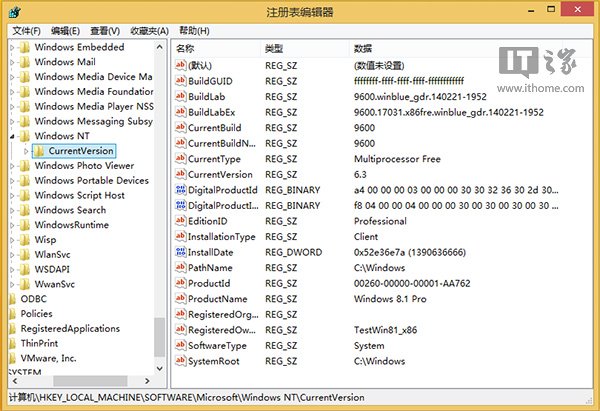
msinfo32):版本 6.3.9600.17031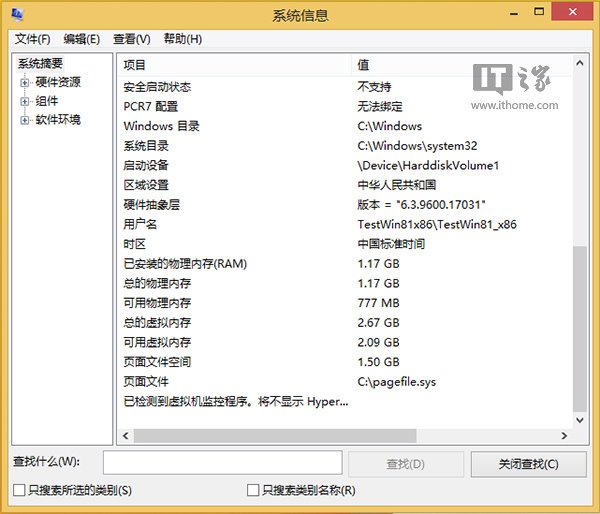
Windows 8 Charms 列(超級按鈕)完整指南:搜尋、分享、開始、裝置、設定五大模組喚出與操作
Win8 桌面建立捷徑三大法:安裝路徑發送、新建捷徑精確指定、從開始畫面複製
使用 DOS 指令製作可攜版 Win8 系統:ImageX /apply 僅需 10GB 隨身碟/行動硬碟
Win8 內建 ISO 燒錄功能:無需第三方軟體即可燒錄光碟映像檔
Windows 8 無權限使用相機?開啟相機應用權限允許存取攝影機與麥克風
Windows 8.1 SkyDrive 深度蛻變:雲端/本地雙瀏覽、線上/離線模式、儲存空間管理、全裝置設定同步