Windows 8 不僅內建虛擬光碟機可掛載 ISO 檔,還整合了燒錄功能,讓您直接將 ISO 映像檔燒錄成實體光碟,完全不需安裝第三方燒錄軟體。
燒錄步驟
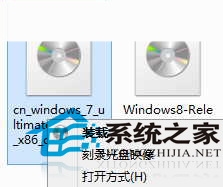
- 在檔案總管中右鍵點擊 ISO 檔案
- 選擇「燒錄光碟映像」
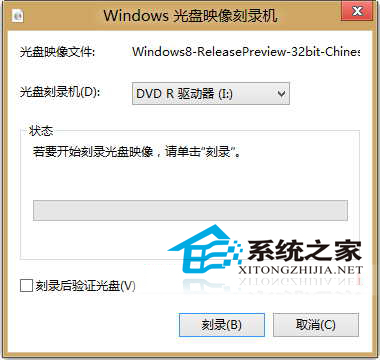
- 在「Windows 光碟映像燒錄器」視窗中選擇燒錄裝置
- 點擊「燒錄」開始製作
優勢總結
- 系統原生功能,相容性佳,無廣告乾擾
- 虛擬光碟機與燒錄功能整合在同一右鍵選單,操作直覺
- 支援 CD/DVD/Blu-ray 等各類光碟格式
這項功能對偶爾需要燒錄系統安裝碟或資料備份光碟的使用者極為實用,省去安裝 Nero、ImgBurn 等大型燒錄軟體的麻煩。