Windows XP Windows 7 Windows 2003 Windows Vista Windows 綜合教學 Linux 系統教學
Windows 10 Windows 8 Windows 2008 Windows NT Windows Server 電腦軟體教學

Windows 8 手動綁定 ARP 防止 ARP 欺騙攻擊

編輯:Win8 系統應用技巧

Windows 8 內建 netsh 指令可手動綁定 IP-MAC 對應,防止區域網路 ARP 欺騙(網路斷線、竊聽),無需第三方 ARP 防火牆(多數不支援 Win8)。

操作步驟

  1. 以管理員身分開啟命令提示字元。
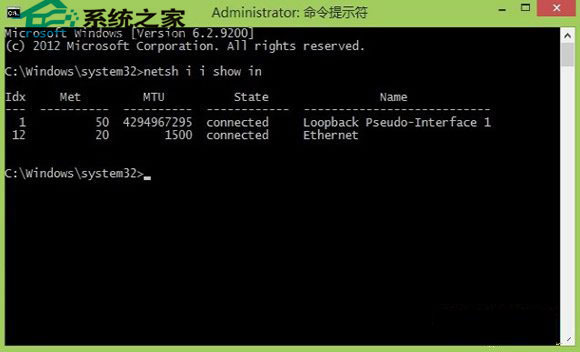
  2. 查看網卡索引編號:
    netsh i i show in
    記下目標網卡的 Idx 號(如 12)。
  3. 綁定 ARP:
    netsh -c "i i" add neighbors 12 192.168.1.1 D0-27-88-C9-7C-A4
    (將 Idx、閘道 IP、閘道 MAC 替換為實際值)。
  4. 驗證綁定:
    arp -a
    列表中該 IP 應顯示為「靜態」類型。

netsh 查看網卡索引

解除綁定

netsh -c "i i" delete neighbors 12(Idx 換為實際值) → 重新開機生效。

建議在穩定網路環境下設定,若網路拓撲變更(換路由器、換閘道 MAC)需重新綁定。企業環境建議部署動態 ARP 檢測(DAI)於交換器層面防護。

Copyright © Windows教程網 All Rights Reserved