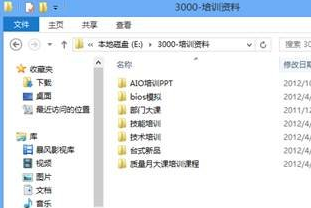
啟用後滑鼠游標移至檔案左側即出現核取方塊,多檔選取無需按住 Ctrl,辦公效率大增,建議常需批次操作檔案者立即開啟。
Windows 8 開啟「問題步驟記錄器」,遠端協助除錯神器
Windows 8 Metro 應用程式關閉方法:工作管理員與快捷鍵
Win8.1 Update RTM 手動安裝順序與版本驗證
Windows 8 IE10 閃退自動關閉解決方案:重設預設瀏覽器、重置 IE、乾淨開機
卸載 Windows 8 還原 Windows 7:利用 Windows.old 資料夾快速復原教學
Win 8 無法使用 Ctrl+Shift 切換輸入法?自訂熱鍵完整解決方案
Windows 8 RP 使用指南:開始畫面、關閉 App、控制台、Media Center、DVD 播放、關機
Win8 禁用 Win 鍵防遊戲誤觸:註冊表 Scancode Map 徹底屏蔽、群組原則僅屏蔽熱鍵雙模式