Microsoft 於 2015 年 4 月釋出安全性更新 KB3045999 (MS15-043) 修補 Win7/Win8/Win8.1 核心模式驅動程式弱點,但此更新導致 Oracle VirtualBox 虛擬機器無法啟動,出現「VT-x/AMD-V hardware acceleration is not available」等錯誤。本文說明解除安裝補丁與封鎖更新的標準流程。
問題現象
安裝 KB3045999 後,VirtualBox 啟動虛擬機器失敗,錯誤訊息提示硬體虛擬化不可用、驅動程式簽名驗證失敗等。重新安裝 VirtualBox 無法解決。
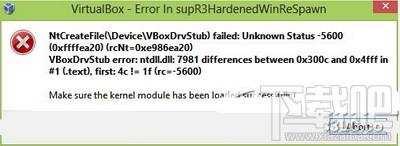
解決方案:解除安裝 KB3045999
- 控制台 → 程式集 → 程式和功能 → 「檢視已安裝的更新」。
- 搜尋「KB3045999」→ 右鍵 → 「解除安裝」。
- 重新啟動電腦,VirtualBox 虛擬機器應恢復正常啟動。
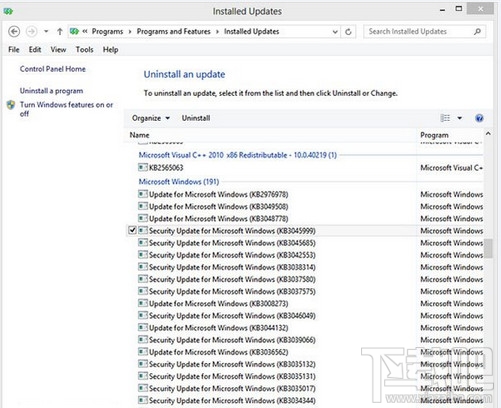
防止自動重新安裝
- Windows Update → 「變更設定」→ 選擇「自動下載更新,但讓我選擇安裝哪些更新」。
- 檢查更新 → 找到 KB3045999 → 右鍵 → 「隱藏更新」。
- 或暫時關閉自動更新,等待 Oracle 釋出相容修正版本或 Microsoft 釋出修正補丁。
後續發展
- Oracle 於 VirtualBox 4.3.28+ 版本修正此相容性問題,建議升級 VirtualBox 至最新版本。
- Microsoft 後續累積更新已包含修正,若已升級 VirtualBox 可嘗試重新安裝 KB3045999。
- VMware Workstation/Player、Hyper-V 不受此更新影響。