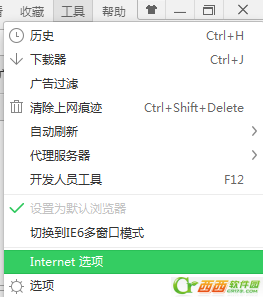
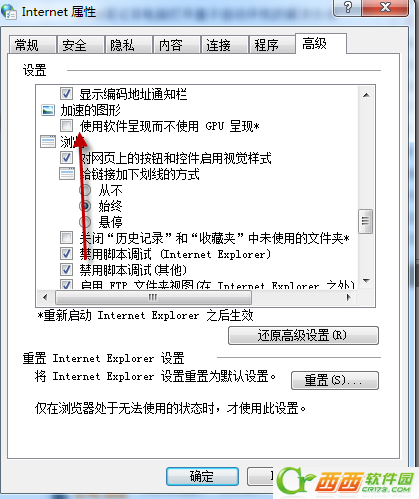
問題與解決方法同文章 80172,針對 360 瀏覽器/IE 通用:
關閉 GPU 硬體加速可解決大多數網頁卡死、未回應情況,適用於 IE、360、Chrome 等基於相同繪圖引擎的瀏覽器。
Win8.1 玩大型遊戲卡頓/卡屏?顯卡驅動更新全流程
Windows 8.1 設定不進入睡眠/待機模式教學
Windows 10/8.1/7 重設所有資料夾檢視至預設值(登錄法)
Win8/8.1 建立虛擬網卡 (Microsoft Loopback Adapter) 圖解:裝置管理員 → 新增過時硬體 → 手動選擇網路介面卡
Win8 主板电池没电时间不准?设置 Internet 时间自动同步/推荐第三方校时工具
Windows 8 使用 Microsoft 帳號免密碼自動登入設定:control userpasswords2 快速啟用
Windows 8 進入安全模式三大法寶:系統設定、Metro 重開機、新增開機選單項目
Win8 升級 8.1 後播放影片出現大面積綠畫面?顯卡設定一招解決