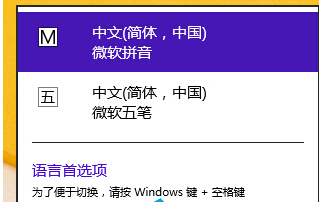
設定後開啟任何文字編輯器預設即為指定輸入法,無需每次手動切換。
Win8 建立桌面 IE 圖示兩大法:魔方美化大師 vs 匯入登錄檔
Windows 8 登出時自動清除動態磚塊過期通知:群組原則設定教學
Win 8.1 安裝 Win 10 雙系統完整教學:壓縮分區建立新磁碟區、掛載 ISO 升級安裝
Win8 家庭群組共用檔案完整教學:建立家庭群組、設定共用資料夾、記錄密碼
Win8 系統寬頻撥號自動連線設定圖解:記住密碼與撥號設定
Windows 8 實用小工具推薦:關機面板、WinX 選單編輯器
Win8 行事曆顯示農曆與國定假日完整設定教學
Win8 如何解除安裝 KB3004394 更新補丁?修復服務無法啟動等嚴重問題