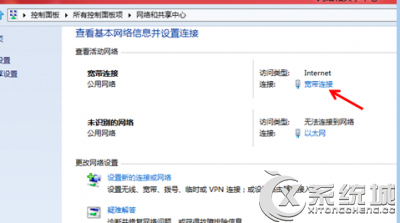
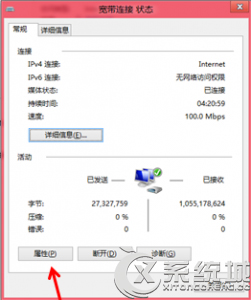
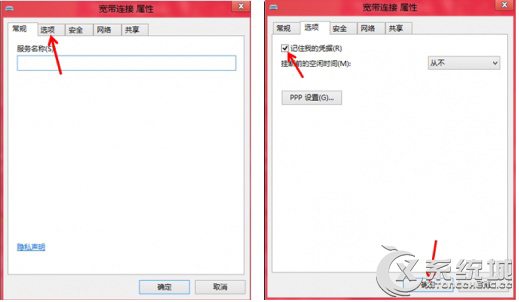
Windows 8 寬帶撥號記住帳號密碼快速步驟:
完成後下次撥號自動填入帳號密碼。
Windows 8 清除遠端桌面連線歷史記錄保護帳號安全
Windows 8 版 UC 瀏覽器評測:Metro 模式免外掛播放優酷/PPTV/CNTV 影片、彈窗智能攔截、瀏覽紀錄一鍵清除
Windows 8.1 設定登入後直接進入傳統桌面
Win8 更改桌面儲存路徑:將桌面資料夾移至非系統盤,減輕 C 槽壓力
Windows 8 開機 CPU 高載、硬碟燈狂閃?退出家庭群組即可解決
Windows 8 常用軟體在 Windows 8.1 上能跑嗎?實測 30+ 款熱門應用相容性報告
升級 Win 8.1 後 iPhone 無法連線 iTunes 的驅動程式修復法
Windows 8.1 睡眠无法唤醒的硬件检测与驱动更新修复指南