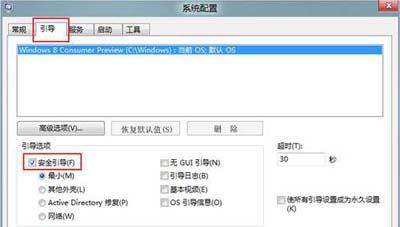
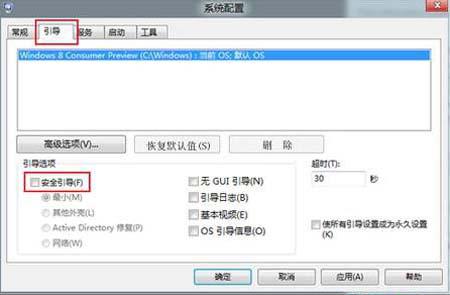
Windows 8 不再支援開機時按 F8 進入安全模式,需透過系統設定工具(msconfig)預設下次開機進入安全模式,或在安全模式下取消設定返回正常模式。
msconfig
此法可在正常模式與安全模式間自由切換,無需記憶複雜開機鍵。
Win8 恢復系統預設色彩設定:色彩管理進階→變更系統預設值→選擇 sRGB 設定檔
Windows 8 自動降低通訊活動時其他聲音音量
Windows 8.1 關閉桌面背景自動輪播教學
Windows 8 右下角通知區域圖示模糊/發虛解決方案:調整 DPI 縮放至 100% 即時恢復清晰
Windows 8 將常用應用、網站、資料夾釘選到「開始」畫面完整教學
Windows 8 檔案總管 Ribbon 介面完整操作指南
Win8 無線網路連不上?兩大排查:硬體開關檢查、重裝無線網卡驅動
Win8 雙系統開機等待時間調整:不想等太久、也怕來不及選