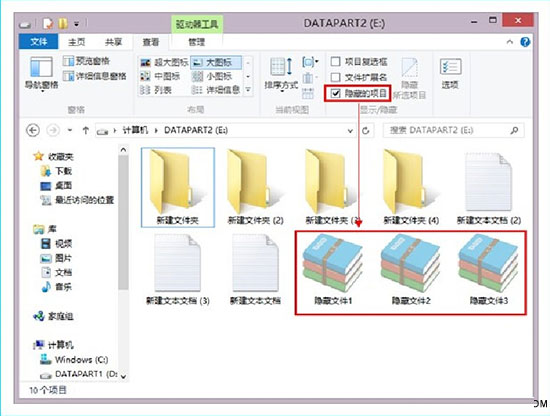
Windows 8 檔案總管提供一鍵顯示隱藏檔案功能,無需進入資料夾選項對話框。
此為 Windows 8 新增的 Ribbon 介面功能,比舊版「資料夾選項→檢視→顯示隱藏的檔案」更直觀快速。取消勾選即恢復隱藏。
Windows 8 一鍵清除應用商店快取:wsreset 指令釋放系統盤空間
Win8 禁止導覽窗格顯示圖片資料夾:資料庫右鍵圖片→「不在導覽窗格中顯示」
Win8 解析度過低無法執行 Modern App?修改登錄突破 1024x768 限制 (筆電/平板適用)
Windows 8 開發者帳號註冊完整圖文流程:MSDN 中文網 → Windows 開發人員中心 → 儀表板 → Microsoft 帳戶驗證 → 填寫資訊 → 協議 → 價格 → 信用卡付款 → 購買確認 → 付款驗證 → 完成
Windows 8 Metro 風格初體驗:顛覆傳統的全新操作介面
Windows 8 查看已儲存無線網路密碼兩種方法圖解
Win8 一鍵還原資源回收筒所有檔案:Ribbon 功能區「管理」標籤操作
Windows 8.1 內建截圖工具無法使用?四大修復方案