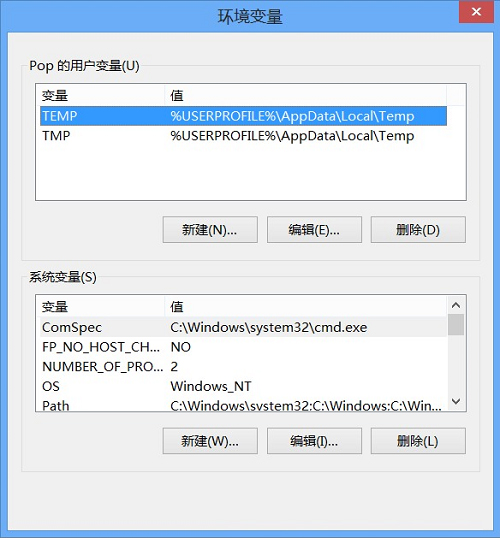
Windows 8.1 預設將暫存檔寫入 C 槽,長期累積導致系統盤膨脹。修改環境變數 TEMP 與 TMP 指向其他磁碟 (如 D:\Temp) 即可分流。
TEMP
TMP
D:\Temp
瀏覽器快取、安裝程式解壓暫存檔、系統暫存檔均導向新路徑,有效減輕 C 槽壓力,延長固態硬碟壽命。
Win8 檔案總管右上角箭頭消失?自訂快速存取工具列找回摺疊鈕
Win8/8.1 開機軟體衝突?乾淨啟動診斷與排除完整教學
Win8系統記憶體洩漏導致卡死?任務管理器定位進程+SSD相容性排查
Win8 解決頻繁彈出「此程式有已知相容性問題」兩種方法:停用服務/群組原則
Windows 8 鎖定畫面個人化完整設定:背景圖片、鎖定畫面應用程式狀態顯示
Windows 8.1 版本號查看兩法:右鍵開始按鈕→系統、或電腦設定→電腦資訊
Win8 開啟「上帝模式」:一個資料夾掌握所有系統設定
Windows 8.1「新增功能」用法詳解:升級版本與啟用關鍵