Windows XP Windows 7 Windows 2003 Windows Vista Windows 綜合教學 Linux 系統教學
Windows 10 Windows 8 Windows 2008 Windows NT Windows Server 電腦軟體教學

Win 8.1 解決 wuauclt.exe 應用程式錯誤 0x8000173c 的停用 Windows Update 服務法

編輯:Win8 系統應用技巧

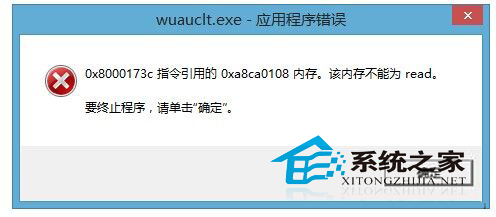
Windows 8.1 開機彈出 wuauclt.exe 應用程式錯誤(0x8000173c 記憶體參考失敗),主因是 Windows Update 服務檢測更新時異常。停用該服務可消除錯誤,亦可緩解系統卡頓。

操作步驟

  1. Win + R → 輸入 services.msc → 確定
  2. 找到「Windows Update」服務 → 雙擊開啟
  3. 「啟動類型」改為「停用」 → 「服務狀態」點擊「停止」 → 確定

wuauclt.exe 錯誤視窗

影響與替代方案

  • 影響:系統不再自動檢測/下載/安裝更新,需手動檢查更新
  • 替代:定期手動執行 Win + R → ms-settings:windowsupdate 檢查更新,或使用第三方更新管理工具(如 WSUS Offline Update)
  • 根治:若不想停用服務,可嘗試重建 Windows Update 元件:
    net stop wuauserv → ren C:\Windows\SoftwareDistribution SoftwareDistribution.old → net start wuauserv

延伸現象

wuauclt.exe 異常常伴隨 CPU/磁碟高佔用、系統回應遲緩。遇到不明原因卡頓時,同樣可嘗試停用 Windows Update 服務排查。

Copyright © Windows教程網 All Rights Reserved