若不習慣 Windows 8 Modern 風格搜尋,可透過「開啟或關閉 Windows 功能」停用 Windows Search,改用 Everything、Listary 等第三方搜尋工具。
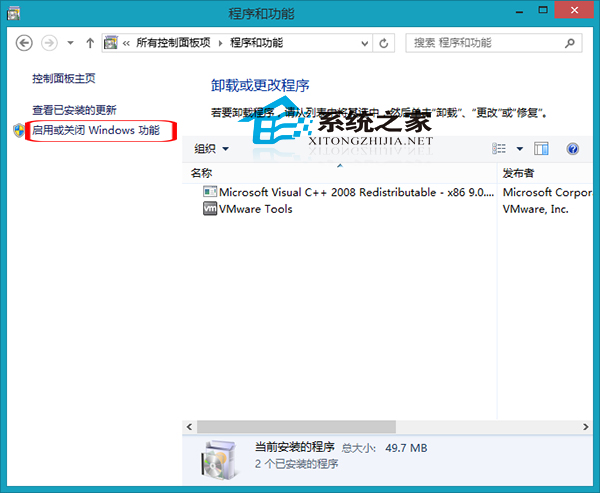
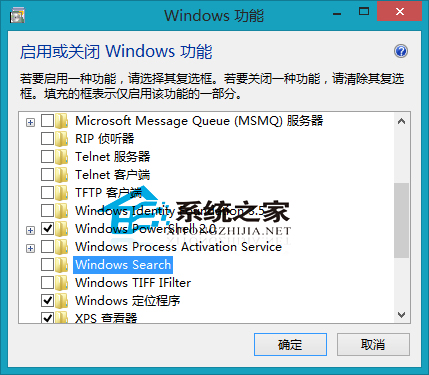
停用後:開始畫面搜尋、檔案總管搜尋框、Win+Q/W/F 熱鍵將失效。第三方工具(如 Everything)以 MFT 直接索引,速度極快且支援通配符、正則表示式,深度使用者強力推薦。
Windows 8 屏幕保護程序完整使用指南:開啟、更換、關閉、自定義照片、協載
Win8 WiFi 自動關閉?關閉休眠/睡眠模式保持網路常駐
無法更新到 Windows 8.1 錯誤 0xc1900101-0x40017:防毒軟體、驅動、外部裝置三大主因與解決方案
SSD ReadyCache 入門級固態硬碟加速方案評測與安裝教學
Win8.1/RT 8.1 新增語言與鍵盤版面完整教學:顯示語言、輸入法切換、預設鍵盤設定
Win8 平板忘記密碼怎麼辦?Shift+重開機進入「重設電腦」三步驟解鎖