便箋 stikynot.exe 報錯常因系統檔案損毀或微軟拼音輸入法衝突。
sfc /scannowDISM /Online /Cleanup-image /RestoreHealth
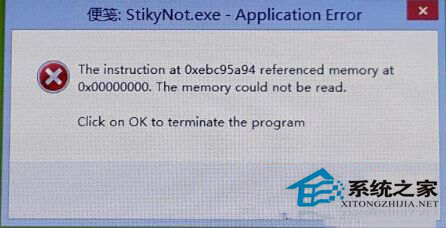
執行完畢重啟,便箋應可正常開啟。若仍失效,考慮建立新使用者帳號測試 (排除用戶設定檔問題)。
Windows 8 快速鎖定電腦兩大技巧:Win+L 與開始畫面鎖定
Win8 相容模式安裝 Win7 驅動程式教學:屬性勾選與強制安裝參數
Win8 列印提示「Automation 伺服器無法建立物件」?IE 安全性設定調整「ActiveX 控制項」即可修復
Win8.1 透過 Windows Update 升級 Win10 完整流程圖解:從下載到桌面 6 階段
Windows 8 分畫面功能使用教學:一邊看電影一邊聊天、Metro 應用與桌面並列
Windows 8 十種關機與重開機方法大全:Charms、捷徑磚、快速鍵、命令列、第三方工具
Win 8.1 解決 wuauclt.exe 應用程式錯誤 0x8000173c 的停用 Windows Update 服務法