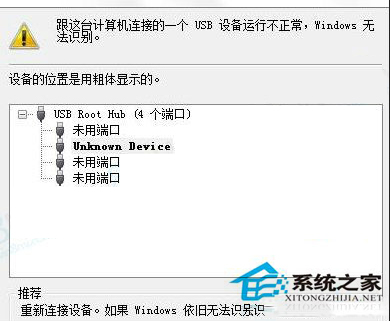
USB 滑鼠顯示「Unknown Device」,通常為 Plug and Play 服務異常或 USB Root Hub 需重新掃描。
Plug and Play
services.msc
Plug and Play 服務負責硬體熱插拔偵測,此服務異常會導致多種 USB 裝置無法辨識。
Windows 8.1 郵件、行事曆、人脈應用迎重大功能更新
應用商店升級 Win8.1 出現「你的 Windows 8.1 安裝無法完成」?wsreset 清除快取解決
Windows 8 多功能工作管理員:內建資源監視器,即時掌握系統效能
Windows 8 安裝中文軟體出現亂碼?區域語言設定改為中國/中文(簡體)即時修復
Windows 8 電源選項新增「休眠」指令:喚醒更快、更省電的節能模式
Windows 8 一鍵還原後初始設定 (OOBE) 完整流程圖解:語言、網路、快速/自訂設定、帳戶建立
Windows 8 IE 瀏覽器網頁圖片不顯示紅叉?重置 IE 設定完美解決
Windows 8 設定桌面背景自動輪播切換教學