Windows 8 變更單雙擊設定的位置移至檔案總管「檢視」索引標籤。本文提供四步驟圖文操作,快速切換開啟方式。
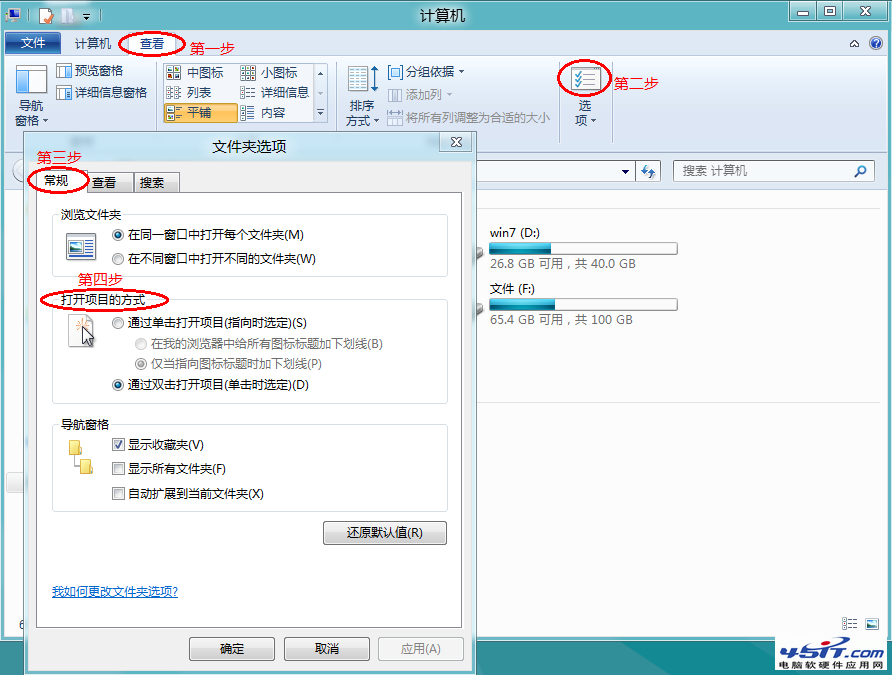
設定即時生效,無需重開機。
基本附件 vs SkyDrive 附件差異對照:大小限制、儲存位置、預覽、協作、權限控制
安裝 Win 8 時用 Diskpart 分區:免工具、不產生 100MB 系統保留區、即時生效
Win8 怎麼下載 QQ?必須透過應用程式商店安裝 Metro 版
Windows 8 應用程式商店無法開啟?DNS、Proxy 與防火牆排查指南
Windows 8 對比 Windows 7:將失去的 10 大經典功能(開始按鈕、Aero、DVD、小工具、備份等)
Win8 內建 Reader 應用閱讀 PDF 技巧(三):縮放比例調整、雙頁顯示、全螢幕閱讀