Windows XP Windows 7 Windows 2003 Windows Vista Windows 綜合教學 Linux 系統教學
Windows 10 Windows 8 Windows 2008 Windows NT Windows Server 電腦軟體教學

解決 Windows 8 無法安裝 .NET Framework 3.5.1 錯誤 0x800F0906:使用安裝媒體離線啟用

編輯:Win8 系統基礎知識

Windows 8 移除預裝 .NET Framework 3.5 (含 2.0/3.0),導致許多舊版應用無法執行,嘗試線上安裝常遇 0x800F0906 錯誤。解決方法:使用 Windows 8 安裝媒體離線啟用。

操作步驟

  1. 將安裝媒體 sources\sxs 資料夾複製至本地 (例:D:\sources\sxs)
  2. 以系統管理員身分開啟命令提示字元 (cmd.exe)
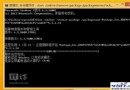
  3. 執行命令:
    dism.exe /online /enable-feature /featurename:NetFX3 /Source:D:\sources\sxs
  4. 等待完成即可使用 .NET 3.5 相容應用

此法繞過 Windows Update 線下載限制,直接從安裝媒體載入元件,成功率極高。

Copyright © Windows教程網 All Rights Reserved