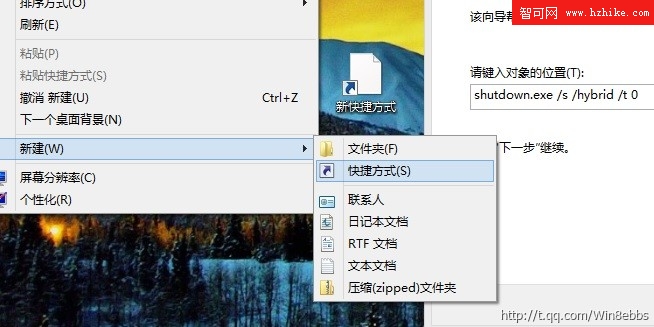
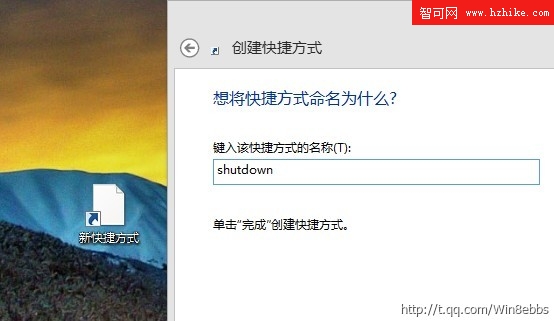
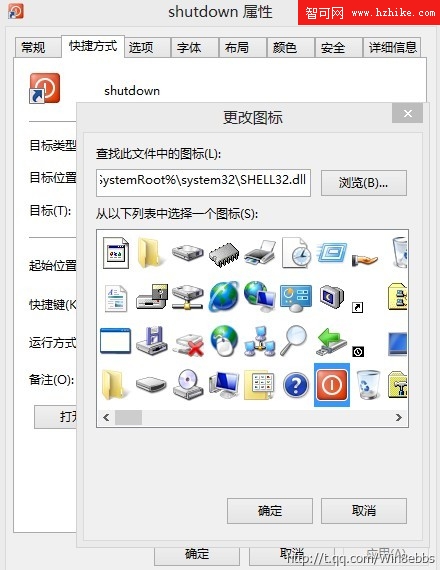
同樣使用 shutdown.exe /s /hybrid /t 0 指令,四步驟完成:
shutdown.exe /s /hybrid /t 0
點擊即關機,無確認提示。誤觸將導致未存檔資料遺失。建議平時使用「睡眠」模式,僅在確定關機時點擊此捷徑。
Windows To Go USB 隨身碟無磁碟代號?diskpart 清除 NODEFAULTDRIVELETTER 標誌恢復正常
Windows 8 圖片庫完整攻略:顯示來源、瀏覽操作、設定鎖定畫面/磚/背景、匯入行動裝置照片
微軟展示 Office Web Apps 在 Win8 觸控裝置上的操作體驗
Windows 8 常見問題彙總解答:下載、語言、Metro 操作全攻略
Windows 8 內建撲克牌與掃雷遊戲去哪了?從 Windows Store 下載
Windows 8 CP 詳細安裝教程(三):產品金鑰、授權、分區選擇、自動重啟配置
Windows 8 六大隱藏功能:系統恢復與效率提升全攻略
微軟首發 Windows 8 開發者預覽版:你必須知道的五大重點