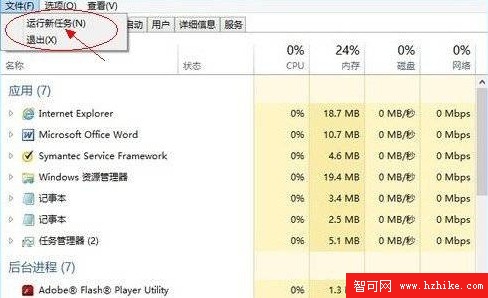
開啟工作管理員(Ctrl+Shift+Esc) → 切換至「詳細資料」模式 → 左上角「檔案」選單 → 「執行新工作」。
此對話框本質等同舊版「執行」(Win+R),僅名稱改為「執行新工作」。輸入 cmd 開啟命令提示字元、iexplore.exe 啟動 IE 等指令皆適用。無新增特殊功能,僅為工作管理員內的快捷入口。
cmd
iexplore.exe
Windows 8 查看公有 IP 與私有 IP 位址完整教學
騰訊官方回應 Win8 版 QQ 嚴重卡死:中文用戶名導致異常,微軟已修復將於下版本解決
ESET NOD32 v7 完整設定指南:從安裝到進階防護調校
Windows 8 輕鬆新增多國語言介面與輸入法切換教學
Windows 8 檔案歷程記錄功能影片示範:守護檔案不遺失
Win8 自動更新功能在哪?開啟與關閉完整教學
Windows 8 Metro 應用程式切換三大技巧:Alt+Tab、Win+Tab、滑鼠熱區
Windows 8 開始畫面一鍵顯示所有系統管理工具磚