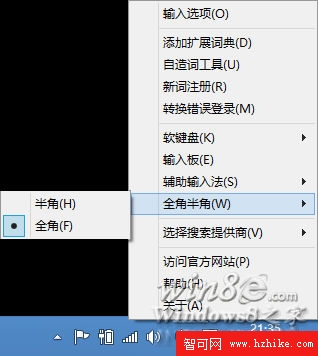
微軟拼音在 Windows 8 取消了 Shift+Space 切換全/半形快捷鍵。若需輸入「【】」,必須切換至全形模式,極度不便。對於頻繁使用書名號的微博編輯、撰寫者而言,這近乎無法接受。
若極度依賴全形符號輸入,建議暫時棄用微軟拼音,改裝第三方輸入法以維持效率。
Win8升級助手完整指南:我的電腦能升級嗎?
Win8 標準觸控鍵盤開啟法:找回 ESC、方向鍵與功能鍵
Win 8/8.1 關閉家庭群組:降低 CPU/硬碟負載、提升續航與流暢度
Windows 8 體驗連載 (五) 隱藏小工具大揭秘 (一):Sysinternals 分螢幕工具 Desktops.exe、快捷鍵切換虛擬桌面
安裝 QQ 後必刪的三個高 CPU 佔用檔案:QQExternal.exe、TXPlatform.exe、TXPFProxy.dll
Win8.1 截圖新技巧:Win+PrtSc 自動存檔、平板音量鍵截圖完整教學
Win8 照片應用程式動態磚塊圖片無法更新?點選「磚塊」→「清除」重設快取
Windows 8 常見問題彙總:輸入法切換、截圖、檔案關聯、語言包等 8 大 Q&A