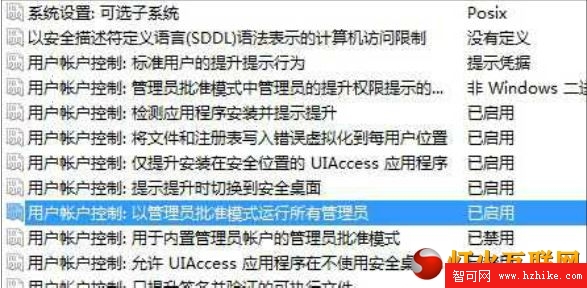
Windows 7 透過控制台 UAC 滑桿拉到最底即可關閉提示,但 Windows 8 同樣操作後警告仍會彈出(頻率降低)。需透過群組原則徹底停用。
gpedit.msc
此法會導致「開始畫面」的 Modern 應用無法啟動。若你習慣使用 Modern 介面,請勿採用此設定,或改用第三方 UAC 調整工具。
Win8.1 Update「應用」視圖如何顯示更多磁貼?教你輕鬆開啟大螢幕顯示模式
微軟推薦使用升級助手升級 Win8:四大核心功能詳解
Windows 8 解決軟體安裝亂碼兩步驟:變更地區與非 Unicode 程式語言設定
Windows 8 消費者預覽版解決建設銀行網銀 U 盾無法使用問題完整記錄
Windows 8 SkyDrive 登出/切換帳號教學:本機帳號才能切換,Microsoft 帳號綁定無法登出
Windows 8 系統更新機制:人性化自動更新、可預測重啟、應用商店更新
Windows 8 快捷鍵大全(二):傳統桌面與 Modern 環境完整對照
Windows 8 架設無線熱點 (虛擬 AP) 指令教學