Windows XP Windows 7 Windows 2003 Windows Vista Windows 綜合教學 Linux 系統教學
Windows 10 Windows 8 Windows 2008 Windows NT Windows Server 電腦軟體教學

Win8 安裝 iTunes 提示「配置前發生錯誤」?啟用 Device Install Service 服務修復

編輯:Windows 8 系統介紹

iTunes 安裝完成前報錯「安裝程式發生錯誤」,主因 Device Install Service (裝置安裝服務) 未啟動,導致驅動安裝階段失敗。啟用該服務即可修復。
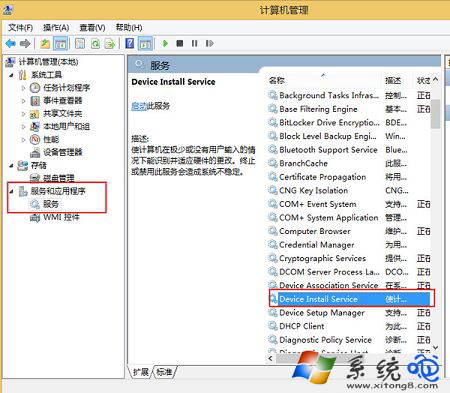
修復步驟

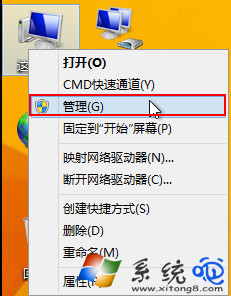
  1. 右鍵「這台電腦」 → 「管理」 → 「服務和應用程式」 → 「服務」。
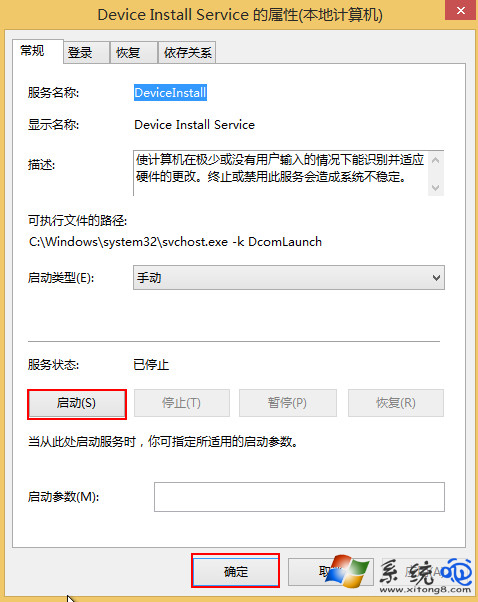
  2. 找到 Device Install Service → 雙擊開啟屬性。
  3. 「啟動類型」改為「自動」 → 點選「啟動」 → 確定。
  4. 重新執行 iTunes 安裝程式。

電腦管理開啟服務

找到 Device Install Service

設為自動並啟動

原理與補充

  • Device Install Service 負責即插即用裝置驅動安裝。iTunes 安裝過程需註冊 Apple Mobile Device USB Driver、USB 串列驅動等,服務停用會導致驅動安裝失敗回滾。
  • 同理,安裝其他需驅動軟體 (如手機助手、印表機驅動) 遇類似錯誤,亦檢查此服務。
  • 若服務啟動後立即停止,檢查事件檢視器「系統」記錄錯誤碼,可能為登錄檔損毀、相依服務 (Plug and Play、Windows Installer) 異常。
Copyright © Windows教程網 All Rights Reserved