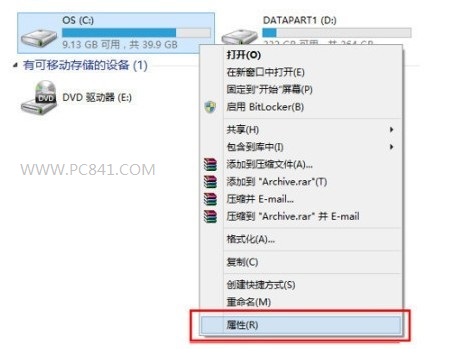
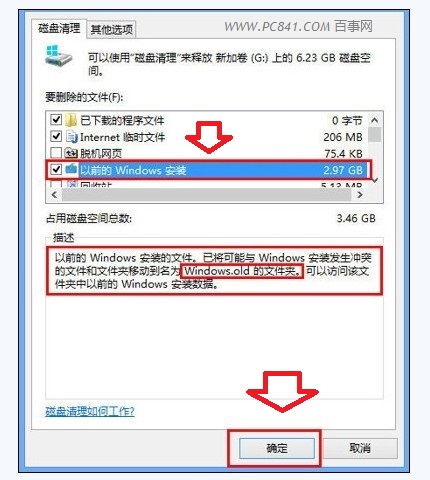
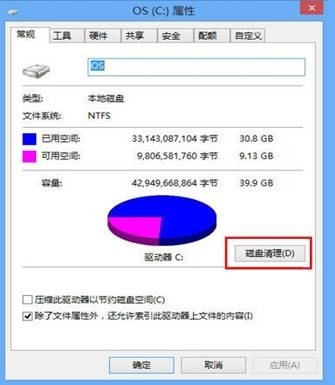
Windows 8 升級 8.1 後,C 槽會殘留大量舊系統檔案(Windows.old),透過磁碟清理可一次移除。
此為升級後最大垃圾檔案,清理後不影響目前系統運作。
Windows 8 全新 Logo 揭曉:回歸「窗」的本質,傾斜藍窗隱喻動感與個人化
Win 8.1 修改桌面資料夾路徑:移至非系統碟保護資料、釋放 C 槽空間
Win 8 透過登錄檔優化解決頻繁當機 修改逾時與自動重啟參數
微軟全產品線 Logo 煥新:追隨 Windows 8 扁平化設計語言
修改 Windows 8 應用商店預設安裝位置,釋放 C 槽空間
Win8/8.1/10/11開啟「執行」對話框:Win+R通用熱鍵與右鍵開始選單兩種方法
Windows 8 開發者預覽版無法安裝 QQ 2011?關閉工作管理器即可解決(TM.exe 進程名稱衝突)
Win8 修改虛擬記憶體(分頁檔)完整教學與最佳設定建議