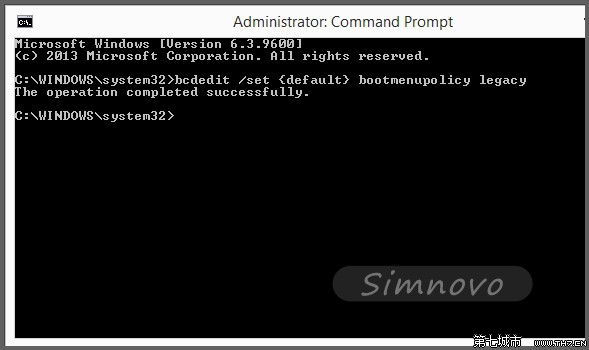
Windows 8 預設移除開機 F8 進階選單,透過 bcdedit 指令可恢復傳統模式。
bcdedit
bcdedit /set {default} bootmenupolicy legacy
執行: bcdedit /set {default} bootmenupolicy standard
bcdedit /set {default} bootmenupolicy standard
同樣適用於 Windows 8.1。
Win8.1 Update 預覽版 13 大新功能搶先看
Win 8 為 IE 新增 Flash 相容網站 修改 IECompatData XML 白名單
Win8 安裝軟件提示「篩選器已阻止啟動」?SmartScreen 解析與解決
Win8.1快速查詢系統安裝日期:systeminfo指令一鍵顯示
Windows 8 修改視窗背景色為護眼綠豆沙色:登錄修改法
Win8 索引服務拖慢電腦?四步關閉不必要索引讓系統更輕快
Windows 8 新手上手指南:從 Metro 介面到觸控操作全攻略(系統城版)
Windows 8.1 桌面屬性新功能詳解:直接開機進桌面、Charms 列熱區微調、開始畫面行為高度自訂