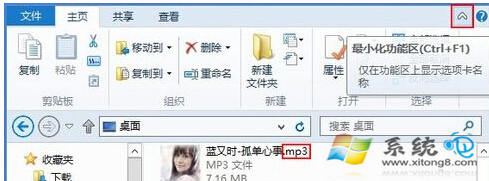
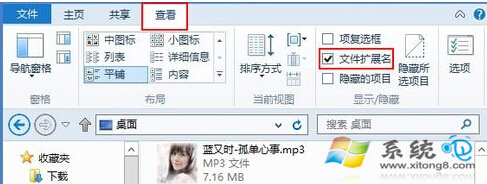
Windows 8 的檔案總管引入 Ribbon 介面,調整「副檔名」顯示設定比以往更直觀。無論您習慣看見完整檔名(如 report.docx),或偏好乾淨的介面(僅顯示 report),都能在幾秒內完成設定。
report.docx
report
此設定屬於使用者層級,僅影響目前登入帳號。若需針對特定資料夾套用不同檢視,可在同一「檢視」頁籤點選「選項」→「變更資料夾與搜尋選項」→「檢視」頁籤進行進階調整。
Windows 8 無線網路「受限/無連線」三大解決方案:啟用 FIPS 相容性、重裝原廠驅動、調整路由器設定
Win8 開機進不了系統?惠普筆電 F11 進入恢復環境重置還原出廠
Windows 8.1 支援 Metro 界面直接更改產品金鑰:slui 命令與開始屏幕搜尋雙入口
Windows 8 調整視覺效果提升效能:自訂動畫、陰影、平滑字體邊緣
Windows 8 輕鬆識別可信任網站:安全瀏覽完整指南
Windows 8 啟用 ReadyBoost 讓 USB 隨身碟充當快取,提升系統回應速度
Windows 8 關閉 SmartScreen 篩選器防止隱私外洩:動作中心兩步驟停用
Win8 音量忽大忽小?關閉通訊活動偵測功能修復