Windows XP Windows 7 Windows 2003 Windows Vista Windows 綜合教學 Linux 系統教學
Windows 10 Windows 8 Windows 2008 Windows NT Windows Server 電腦軟體教學

Win8 安裝 KB3081455 更新失敗?sfc /scannow 修復系統檔案後重試

編輯:Windows 8 系統介紹

Windows 8 安裝更新 KB3081455 反覆失敗 (線上/離線皆失敗),常因系統檔案損毀導致更新套件無法套用。執行 sfc /scannow 修復系統檔案後,再次嘗試安裝即可成功。
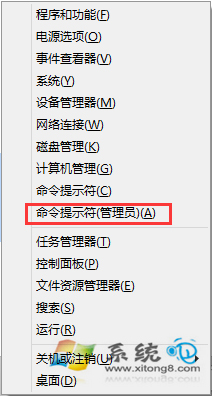
修復步驟

  1. Win + X → 命令提示字元 (系統管理員)。
  2. 執行 sfc /scannow (注意原文寫錯為 sfc /scannnow,正確為單一 n)。
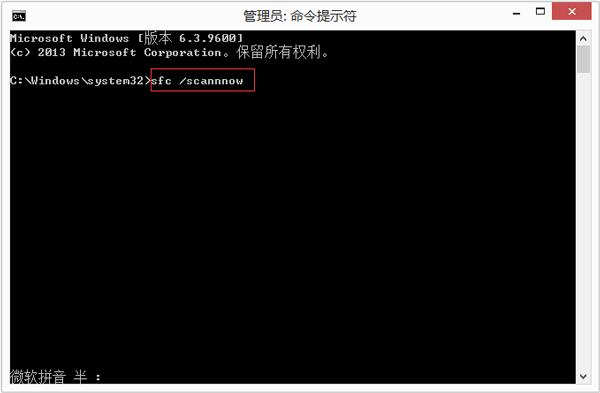
  3. 等待驗證 100% 完成,若提示「已修復」則重新開機。
  4. 重新執行 Windows Update 或手動安裝 KB3081455 .msu 檔案,應可成功。

若仍失敗

  • 執行 DISM /Online /Cleanup-Image /RestoreHealth 修復元件存放區後再跑 sfc。
  • 下載 KB3081455 獨立安裝包 (Microsoft Update Catalog) 以管理員身分執行 .msu。
  • 檢查 C:\Windows\Logs\CBS\CBS.log 尋找具體錯誤代碼 (如 0x800F0906, 0x800F081F) 進一步排查。


Copyright © Windows教程網 All Rights Reserved