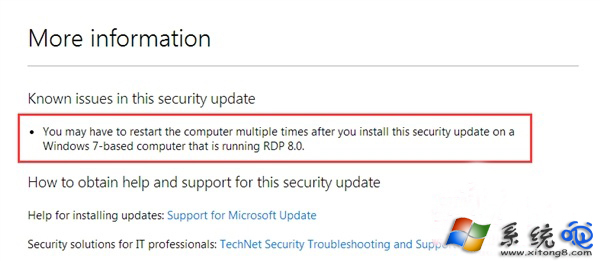
KB3126446 為 RDP 8.1 更新,若系統啟用「遠端桌面」服務,安裝後會陷入無限重開機循環。微軟已確認此問題但尚未發布修正版,建議不需遠端桌面的使用者勿安裝,已安裝者請解除安裝。
微軟知識庫 KB3126446 頁面標註「已知問題:安裝後可能導致系統反覆重新啟動」,建議等待後續累積更新修正或永久隱藏該更新。
Win8 版愛奇藝評測:動態磚、離線下載、多螢幕互動,平板追劇新體驗
Windows 8卸載已安裝程式:控制台「程式和功能」標準流程
見識 Win8 複製貼上新魅力:即時速度圖表、暫停/繼續、多工作業整合
給 Windows 8 作業系統的六項建議:從使用者角度看改進方向
Win8 調整系統文字大小:自訂 DPI 縮放比例教學
Win8 網頁圖片顯示紅叉無法載入?IE 重設與清除快取徹底修復
Win8「分享」超級按鈕功能說明
Windows 8 開發者預覽版預設啟用遙測回報:收集硬體與使用資料