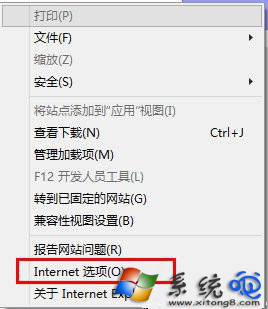
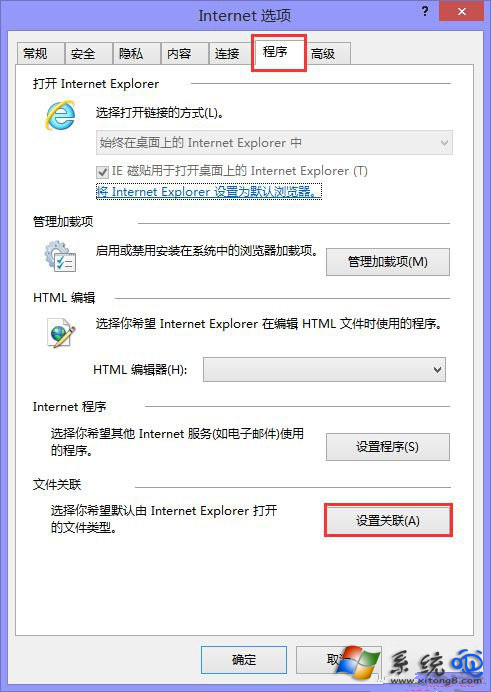
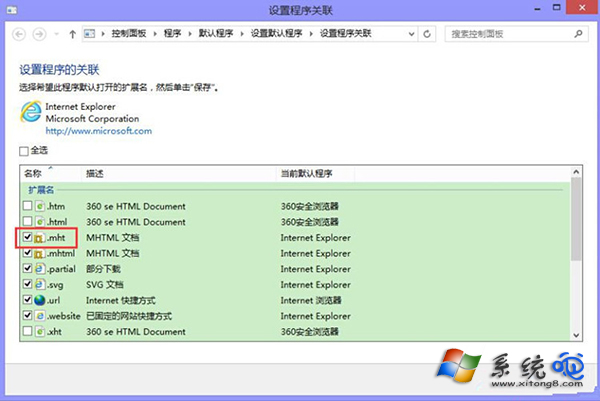
.mht (MHTML) 是網頁封存格式,預設由 Internet Explorer 開啟。若雙擊無反應或以其他程式開啟,通常是檔案關聯遺失。透過 IE 「網際網路選項」→「程式」→「設定關聯」勾選 .mht 即可恢復。
assoc .mht=mhtmlfile
ftype mhtmlfile="C:\Program Files\Internet Explorer\iexplore.exe" "%1"
Win8/8.1 命令列查看與刪除無線網路設定檔
Win8 系統保留分區功能詳解與操作指南
Windows 8 連接無線網路兩大方案:手動設定與快速連線完整教學
Windows 8 終結 Service Pack 時代:採用累積更新 (CU) 機制,功能更快交付、靈活迭代
Windows 8.1 開始畫面磚群組命名、分組、調整大小完整操作指南
MWC 2012 即將登場:Windows 8 Consumer Preview 重磅發布
Win8 安裝 Photoshop CS5 完整實測:序號、Hosts 修改與漢化正確姿勢
Windows 8 關閉系統保護功能以釋放磁碟空間完整教學