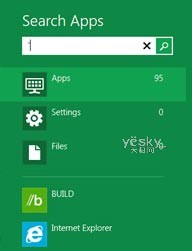
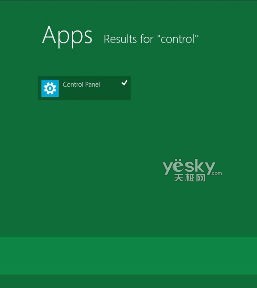
誤刪開始畫面控制台磚塊後,可透過內建搜尋快速找回並重新釘選,無需重裝或修改登錄。
Control
此法適用於所有可搜尋到的應用程式、設定項目、檔案。開始畫面誤刪磚塊時,搜尋 → 右鍵 → 釘選,通用解法。
細節見真章:Windows 8 Pre-Beta 版 IE10 與商店圖示微調
Win8 開啟錄音機三大法:搜尋、執行指令、開始畫面全搞定
Win8 查看還原點空間佔用與設定最大配額:系統保護進階管理
Win8 安全模式進不去?用 msconfig 設定下次重開機強制進入
Win 8 Windows Media Player 音樂管理:建立播放清單、同步到手機、燒錄光碟
Windows 8 區域網路共享資料夾完整設定:資料夾共用權限、進階共用、關閉密碼保護共用
Windows 8.1 進入安全模式三種完整方法
微軟多國招募 Windows 8 行銷人員,RTM 版本傳 2012 年 4 月釋出