Windows XP Windows 7 Windows 2003 Windows Vista Windows 綜合教學 Linux 系統教學
Windows 10 Windows 8 Windows 2008 Windows NT Windows Server 電腦軟體教學

解決 Win8 應用商店 0x80073cf9 錯誤:只需建立缺失資料夾

編輯:Windows 8 系統介紹

在 Windows 8 的應用商店安裝應用程式時,若跳出「未安裝此應用程式 – 查看詳細資訊」並顯示錯誤代碼 0x80073cf9,別慌張,這通常不是系統損壞,而是清理軟體誤刪了關鍵資料夾導致的。
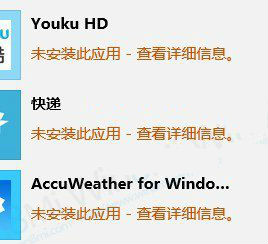
Win8 應用商店 0x80073cf9 錯誤畫面

錯誤成因

許多使用者為了釋放空間會使用清理工具掃描並刪除「空資料夾」,但 Windows 8 的應用商店安裝機制依賴 C:\Windows\auinstallagent 這個資料夾。一旦被誤判為空資料夾而刪除,應用商店就無法完成安裝流程,進而拋出 0x80073cf9 錯誤。

快速修復步驟

  1. 開啟檔案總管,進入 C:\Windows 目錄。
  2. 在空白處右鍵選擇「新增」→「資料夾」。
  3. 將資料夾命名為 auinstallagent(全小寫)。
  4. 完成後重新嘗試在應用商店安裝應用程式,錯誤即可解決。

小提醒:建議在使用清理軟體時,將 C:\Windows\auinstallagent 加入排除清單,避免日後再次發生此問題。

Copyright © Windows教程網 All Rights Reserved