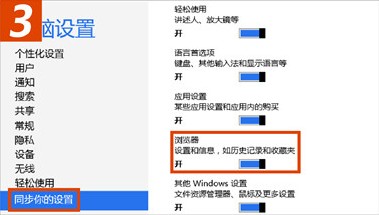
Windows 8 支援 Microsoft/MSN 帳戶登入自動同步系統設定,包含 IE10 收藏夾、歷史記錄、首頁、密碼等瀏覽器資料,預設開啟。可單獨控制瀏覽器同步開關。
設定路徑
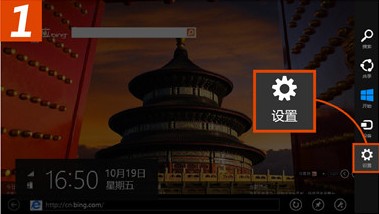
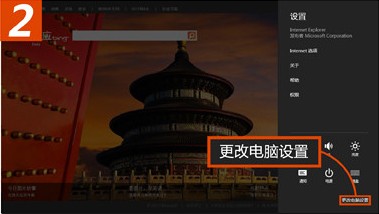
- Win+I 或右邊緣滑動 → Charms「設定」→「變更電腦設定」。
- 左側「同步處理您的設定」→ 右側找到「瀏覽器」項目。
- 開關切換即可啟用/停用 IE10 同步。
適用範圍與限制
- ✅ 僅限 **Windows 8 之間** 的 IE10 同步。
- ❌ 不支援 Windows 7/XP 的 IE 同步。
- 💡 跨舊版 Windows 同步收藏夾,可用 Microsoft 官方 Windows Live Mesh 或第三方 Favekeeper。
同步機制
資料加密上傳至 SkyDrive 隱藏儲存區,不同裝置登入同一 Microsoft 帳戶後自動下載合併,衝突以時間戳最新者為準。同步頻率約數分鐘一次,可手動在同步設定頁「立即同步」。
善用帳戶同步,讓您的瀏覽器環境在桌機、筆電、平板間無縫流轉。