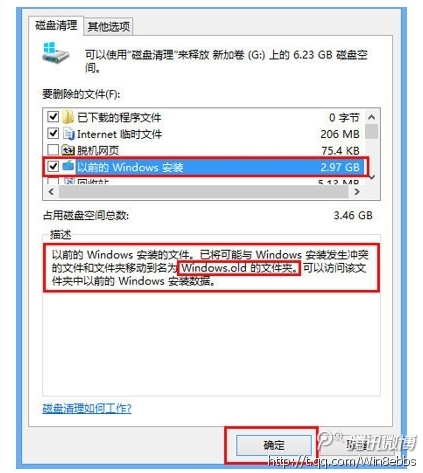
從舊版 Windows 升級到 Win8 後,系統會保留 C:\Windows.old 資料夾(含舊系統檔案),佔用大量 C 槽空間。確認不需回復舊系統後,可透過「磁碟清理」快速移除。
C:\Windows.old
完成後可釋放數 GB 至十數 GB 空間,讓 C 槽恢復輕盈。
Windows 8 15 大實用技巧:關機、多工、搜尋、Charms、工作列完全掌握
Windows 8 入門操作指南完整版:手勢、鍵鼠、多工、搜尋、同步、常見任務一書通
Windows 8 Metro 應用程式顯示離線無法聯網解決教學:網路介面卡協定重設
Windows 8 設定預設開啟程式:單次使用與永久關聯兩種模式
Windows 8 Modern 應用程式異常完整排解:更新應用、同步授權、重新安裝、聯繫開發者
Windows 8 開發者預覽版與消費者預覽版安裝流程比較
Win8.1 取得最高管理權限完全掌控系統:安全性頁籤降權 Everyone + SYSTEM 完全控制實戰
Windows 8 鎖定畫面壁紙自訂:內建圖片、本地相片、必應每日美圖三大來源任你換