Windows XP Windows 7 Windows 2003 Windows Vista Windows 綜合教學 Linux 系統教學
Windows 10 Windows 8 Windows 2008 Windows NT Windows Server 電腦軟體教學

Windows 8.1 五步驟建立本地搜尋快捷方式:%windir%\explorer.exe search-ms: 一鍵啟動強大搜尋

編輯:Windows 8 系統介紹

操作教學

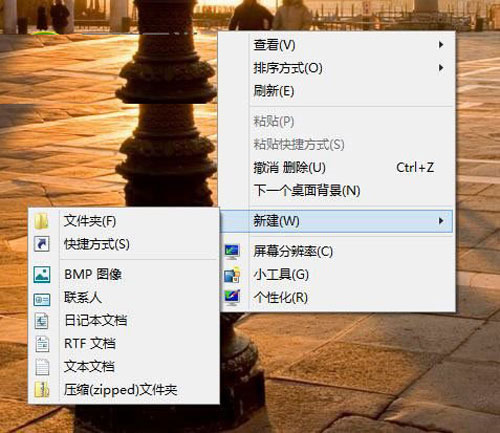
  1. 桌面空白處右鍵 → 新增 → 捷徑。
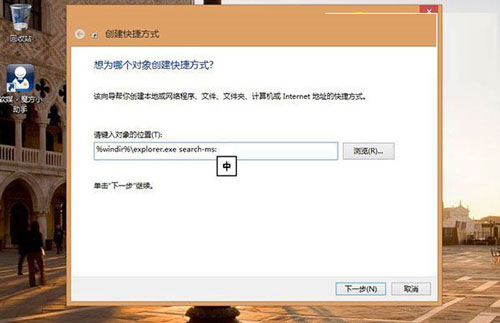
  2. 輸入物件位置:%windir%\explorer.exe search-ms:
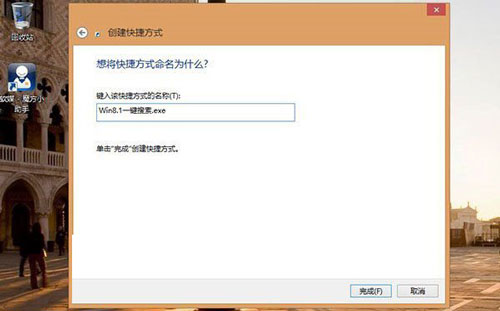
  3. 下一步,命名為「Win8.1 一鍵搜尋」(或自訂)。
  4. 可變更圖示(第三方 icon),並釘選到開始畫面。
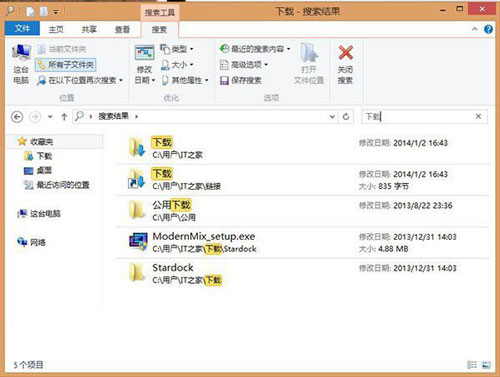
  5. 需要搜尋本地檔案時,雙擊捷徑即刻進入搜尋介面。
新增捷徑
桌面新增捷徑
輸入指令
輸入 %windir%\explorer.exe search-ms:
命名捷徑
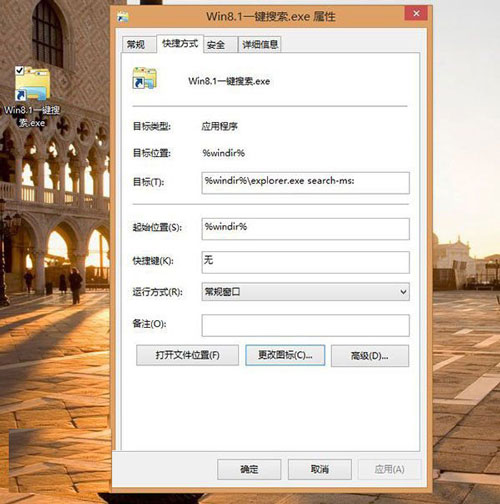
命名捷徑
變更圖示釘選
變更圖示並釘選到開始畫面
搜尋介面
雙擊捷徑進入搜尋介面

善用 Windows 8.1 強大搜尋功能,建立快捷方式大幅提升檔案尋找效率。

Copyright © Windows教程網 All Rights Reserved